| # | Product | Rating | Price | |
|---|---|---|---|---|
| 1 | TiviMateBest IPTV Player | Free / ≈ €10/yr Premium | Check Price | |
| 2 | PlexBest All-in-One | Free / ≈ €5.99/mo Pass | Check Price | |
| 3 | JellyfinBest Free Server | Free (open source) | Check Price | |
| 4 | KodiMost Customisable | Free (open source) | Check Price | |
| 5 | VLCBest Utility Player | Free (open source) | Check Price | |
| 6 | EmbyPlex Alternative | Free / ≈ €5.40/mo Premiere | Check Price |
The apps in this guide do one job brilliantly: play live TV playlists, network streams and your own media library on any screen — with an interface that beats most set-top boxes. We tested six of the best on Fire TV Stick 4K Max, Android/Google TV and (where available) Apple TV.
These apps are players only. Make sure your content source is licensed in your country.
How We Tested
Per our methodology:
- Devices: Fire TV Stick 4K Max, Google TV Streamer 4K, Apple TV 4K where supported.
- Sources: a legal M3U playlist from a European ISP TV subscription, free-to-air broadcaster streams, and a personal media library (1080p/4K files) for the server apps.
- Criteria: setup time, interface on a TV remote, EPG (TV-guide) handling, playback stability over 4+ hours per app, and what the free tier really includes.
| # | App | Best for | Platforms | Rating | Price |
|---|---|---|---|---|---|
| 1 | TiviMate | Best IPTV Player | Android TV / Fire TV / Google TV | 4.7/5 | Free / ≈ €10/yr Premium |
| 2 | Plex | Best All-in-One | Every platform, including Apple TV | 4.6/5 | Free / ≈ €5.99/mo Pass |
| 3 | Jellyfin | Best Free Server | Android TV, Fire TV, web (Apple TV via third-party clients) | 4.4/5 | Free (open source) |
| 4 | Kodi | Most Customisable | Android TV, Fire TV, Linux, Windows, macOS | 4.3/5 | Free (open source) |
| 5 | VLC | Best Utility Player | Every platform, including Apple TV | 4.2/5 | Free (open source) |
| 6 | Emby | Plex Alternative | Fire TV, Android TV, Apple TV | 4.0/5 | Free / ≈ €5.40/mo Premiere |
1. TiviMate — Best IPTV Player
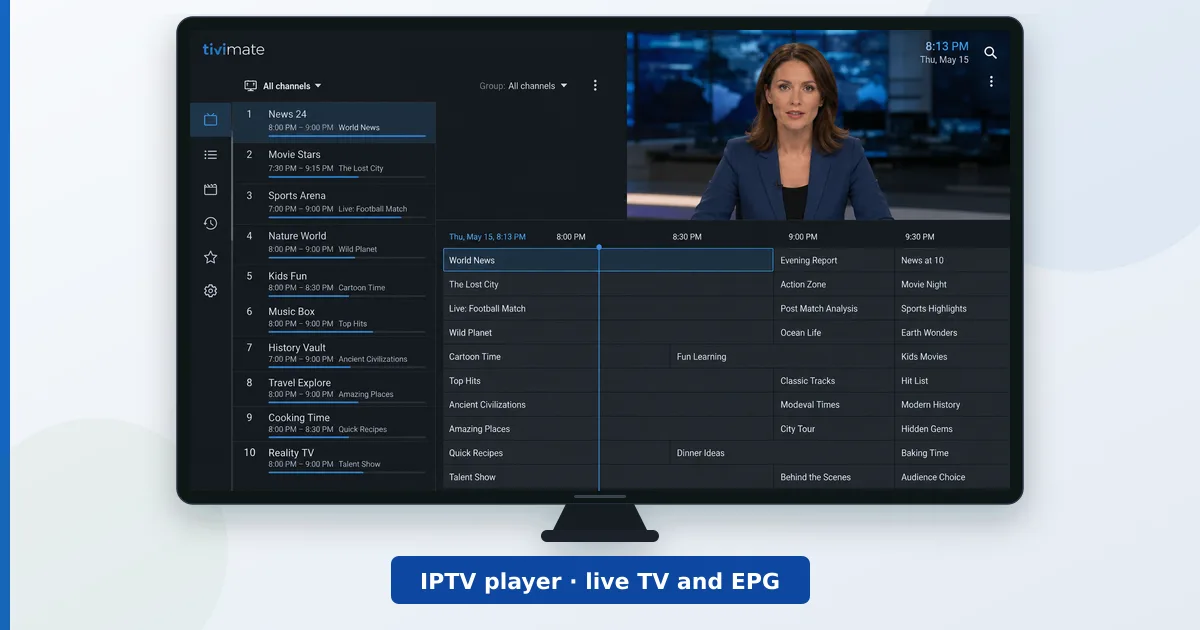
If your ISP or TV provider gives you an M3U playlist, TiviMate is the best way to watch it on a TV. Its channel grid and EPG feel like a premium set-top box: fast zapping, catch-up support, multi-playlist handling and a remote-friendly interface nothing else here matches.
Key facts:
- Android TV / Fire TV / Google TV (no iOS/Apple TV)
- Free tier: single playlist, core features
- Premium (≈ €10/year): multiple playlists, catch-up, recording, favourites sync
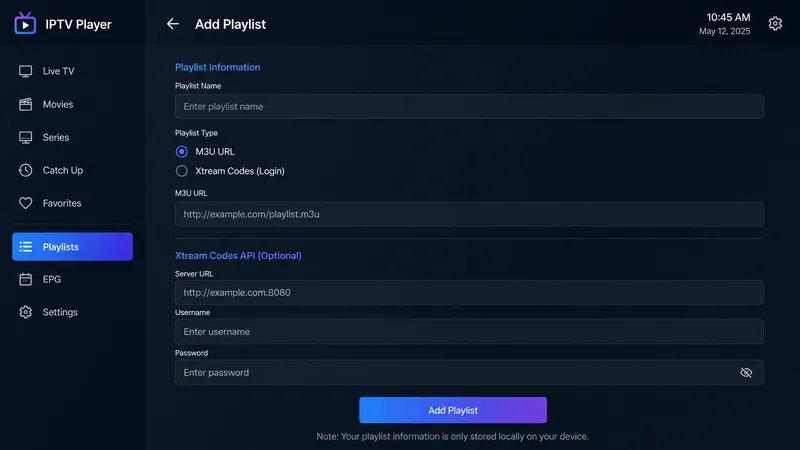
Setup took us under five minutes: enter the playlist URL from your provider, let it pull the EPG, done. The premium price is trivial for what it adds. The only real limitation is platform: Android-family devices only.
✅ Pros
- Best-in-class EPG and channel-zapping experience
- Excellent with legal ISP/operator playlists
- Cheap premium tier (≈ €10/year)
❌ Cons
- Android/Fire TV only — no Apple TV app
- Recording needs premium + local storage
Read our full TiviMate review for the detailed test.
2. Plex — Best All-in-One
Plex turned “my films on the NAS” into a Netflix-like experience years ago, and in 2026 it’s still the most polished way to stream your own library to every screen — plus a growing catalogue of legal, ad-supported free channels and films (FAST) that’s surprisingly decent in Europe.
Key facts:
- Server on PC/NAS/Shield; clients on every platform including Apple TV
- Free: local streaming, FAST channels; Plex Pass (≈ €5.99/mo): hardware transcoding, offline downloads, live TV/DVR with a tuner
- Polished apps, automatic artwork/metadata
In our tests remote streaming was effortless and the TV apps are the slickest here. Downsides: the best features keep migrating behind Plex Pass, and the company’s push into rentals/social clutters the once-clean interface.
✅ Pros
- Easiest server setup, best-looking clients
- Runs on everything, including Apple TV
- Legal free FAST channels included
❌ Cons
- Key features locked behind Plex Pass
- Interface increasingly pushes Plex's own content
- Account/cloud dependency
Read our full Plex review for the detailed test.
3. Jellyfin — Best Free Media Server
Jellyfin is what Plex used to be: a media server that is entirely yours. It’s open source, free forever, with no account, no cloud, no telemetry — your server, your files, your rules. For privacy-minded Europeans, that pitch lands.
Key facts:
- 100% free and open source; no premium tier at all
- Server on PC/NAS/Docker; clients on Android TV, Fire TV, web; solid third-party Apple TV clients (e.g. Swiftfin)
- Hardware transcoding included free (Plex charges for this)
Setup demands a little more comfort with settings than Plex, and clients are functional rather than beautiful. But everything works, nothing nags you to upgrade, and the community moves fast. Pair it with a mini-PC or NAS and you own your streaming stack end to end.
✅ Pros
- Completely free — including hardware transcoding
- No account, no cloud, no tracking
- Active open-source development
❌ Cons
- Rougher setup than Plex
- Official Apple TV support relies on third-party clients
- Remote access requires manual configuration
Read our full Jellyfin review for the detailed test.
4. Kodi — Most Customisable
Kodi is the veteran open-source media centre — 20+ years old and still unmatched for customisation. Skins, add-ons, library scrapers, PVR backends for live TV with a tuner: if you can imagine a home-theatre setup, Kodi can be shaped into it.
Key facts:
- Free, open source; runs on Android TV, Fire TV, Linux, Windows, macOS
- PVR support: watch/record live TV with legal tuner backends (e.g. Tvheadend, NextPVR)
- Massive skin/add-on ecosystem
We recommend installing Kodi from the official site and sticking to official-repo add-ons for stability and security. For a pure local-library player on a single TV, it’s still superb; households wanting multi-device sync are better served by Plex/Jellyfin.
✅ Pros
- Unlimited customisation, skins and add-ons
- Excellent local playback (every codec, every format)
- Legal live-TV/PVR with a tuner backend
❌ Cons
- Steeper learning curve than anything else here
- No built-in multi-device library sync
- Third-party piracy add-ons tarnish its name — stick to official repos
5. VLC — Best Utility Player
VLC is the Swiss army knife on every platform: it opens practically any file, stream URL or network share you throw at it, with zero setup. It isn’t a living-room interface — it’s the tool you reach for when something won’t play anywhere else.
Key facts:
- Free, open source, on literally every platform (including Apple TV)
- Plays M3U streams, network shares (SMB/UPnP), and every codec that matters
- No accounts, no ads, ever
On a TV, VLC’s interface is basic and EPG support is minimal — TiviMate is far better for daily live-TV watching. But as a second app for testing a stream, playing an odd file format or reading a NAS share directly, nothing beats it.
✅ Pros
- Plays everything, everywhere, free
- Zero setup — open a URL or share and go
- Great for testing playlists/streams
❌ Cons
- Bare-bones TV interface
- Weak EPG — not a daily live-TV driver
6. Emby — The Plex Alternative
Emby sits between Plex and Jellyfin (which forked from it in 2018): more configurable than Plex, more polished than Jellyfin, with strong live-TV/DVR support when paired with a tuner. Its Premiere tier prices similarly to Plex Pass.
Key facts:
- Server on PC/NAS; clients on Fire TV, Android TV, Apple TV
- Free tier for basic streaming; Premiere (≈ €5.40/mo) for DVR, offline sync, hardware transcoding
- Fine-grained user management — good for families
In testing it did everything Plex did with a bit less gloss and a bit more control. It’s the pick if Plex’s cloud direction bothers you but Jellyfin feels too DIY.
✅ Pros
- Strong live-TV/DVR with tuners
- Granular parental/user controls
- Less cloud-dependent than Plex
❌ Cons
- Smaller community than Plex/Jellyfin
- Best features need Premiere subscription
- Clients less polished than Plex
Read our full Emby review for the detailed test.
Which App Should You Choose?
- You have an IPTV playlist from your provider → TiviMate (Android/Fire TV).
- You want your own films/series on every screen, minimum effort → Plex.
- Same, but free and fully private → Jellyfin.
- One TV, maximum customisation, local files → Kodi.
- A do-anything utility player → VLC (keep it installed regardless).
- Plex features with more control → Emby.
And to run any of them well on a TV, see our guide to the best streaming devices — a €45–80 certified device runs all six apps happily.
Full Reviews and Comparisons
We test each app in depth. Reviews: TiviMate, IPTV Smarters and OTT Navigator (IPTV players), Plex, Jellyfin and Emby (media servers), Kodi (media centre), VLC (utility player), Stremio (media hub) and Infuse (Apple TV player). Head-to-heads: Plex vs Jellyfin, Plex vs Emby, Kodi vs Plex and TiviMate vs IPTV Smarters. Setup guides: Plex, Jellyfin, Kodi and Emby, plus how to add an M3U playlist. Helper guides: set up an EPG, organize channels in TiviMate, best official Kodi add-ons, best Plex server hardware and subtitles setup.
Our Verdict
TiviMate is the best IPTV player in 2026, and Plex is the best all-round streaming app for personal libraries — with Jellyfin the free, private alternative that keeps getting better. All six apps are actively maintained and run beautifully on cheap certified hardware — a streaming setup that beats any cable box.