| # | Product | Rating | Price | |
|---|---|---|---|---|
| 1 | Amazon Fire TV Stick 4K MaxBest Overall | ≈ €79 | Check Price | |
| 2 | NVIDIA Shield TV ProBest Premium | ≈ €219 | Check Price | |
| 3 | Google TV Streamer 4KBest for Google Homes | ≈ €119 | Check Price | |
| 4 | Apple TV 4K (3rd Gen)Best for Apple Users | ≈ €169 | Check Price | |
| 5 | Xiaomi TV Box S (2nd Gen)Best Budget | ≈ €45 | Check Price |
Choosing a streaming device in 2026 is harder than it should be. Every box and stick promises “4K HDR” and “thousands of apps,” but real-world differences — remote quality, app support for European services, upscaling, and long-term software updates — only show up after weeks of daily use.
We bought all five devices in this guide with our own money and used each one as our main streamer for at least two weeks, on European accounts and European internet connections. Below you’ll find our comparison table, detailed reviews with pros and cons, and a short buying guide to help you pick the right one for your living room.
How We Tested
Our testing methodology is simple and repeatable (read more on our How We Test page):
- Real-world use: each device replaced our main streamer for 2+ weeks.
- European services: we tested Netflix, Prime Video, Disney+, YouTube, and national broadcaster apps (BBC iPlayer, ARD, RaiPlay, France.tv) for availability and playback quality.
- Performance: cold-boot time, app-launch time, and menu responsiveness, measured with a stopwatch, averaged over five runs.
- Picture quality: 4K HDR (Dolby Vision / HDR10+) verified on the same LG C-series OLED panel.
- Remote & ecosystem: voice search accuracy, TV controls (CEC/volume), and how pushy the ads on the home screen are.
- Updates: the manufacturer’s track record of shipping security and feature updates.
Prices shown are typical European street prices at the time of writing — they fluctuate, so check current prices via the buttons.
| # | Device | Best for | Rating | Price |
|---|---|---|---|---|
| 1 | Amazon Fire TV Stick 4K Max | Best Overall | 4.6/5 | ≈ €79 |
| 2 | NVIDIA Shield TV Pro | Best Premium | 4.8/5 | ≈ €219 |
| 3 | Google TV Streamer 4K | Best for Google Homes | 4.4/5 | ≈ €119 |
| 4 | Apple TV 4K (3rd Gen) | Best for Apple Users | 4.7/5 | ≈ €169 |
| 5 | Xiaomi TV Box S (2nd Gen) | Best Budget | 4.1/5 | ≈ €45 |
1. Amazon Fire TV Stick 4K Max — Best Overall
The Fire TV Stick 4K Max is the device we recommend to most readers. It is small enough to hide behind the TV, powerful enough that menus never lag, and its app coverage in Europe is essentially complete — including national broadcasters that skip smaller platforms.
Key specs:
- 4K HDR: Dolby Vision, HDR10+, HLG
- Wi-Fi 6E, 16 GB storage
- Alexa voice remote with TV volume controls
- Audio: Dolby Atmos passthrough
In our tests it cold-booted in around 20 seconds and launched Netflix in under 3 seconds. The Ambient Experience (artwork/widgets on idle) is a nice bonus on living-room TVs. The main annoyance is Amazon’s ad-heavy home screen, which pushes Prime content hard.
✅ Pros
- Excellent price-to-performance ratio
- Complete European app coverage (incl. national broadcasters)
- Wi-Fi 6E — noticeably fewer buffering hiccups on busy networks
- Remote controls TV power and volume
❌ Cons
- Home screen is full of ads and Prime promotions
- Alexa-first — weaker if you use Google Assistant at home
2. NVIDIA Shield TV Pro — Best Premium
Seven years after its last hardware refresh, the Shield TV Pro is still the most capable streamer you can buy in Europe — which says as much about the market as it does about NVIDIA. Its party trick is AI upscaling: 1080p content genuinely looks closer to 4K than on any other device we tested.
Key specs:
- Tegra X1+ processor, 3 GB RAM, 16 GB storage (expandable via USB)
- 4K HDR: Dolby Vision, HDR10
- Android TV with Google Play — plus Plex Media Server built in
- GeForce NOW cloud gaming at up to 4K
It is the only device here that can act as a full Plex server, and the only one that treats power users as customers rather than ad audiences. At around €219 it is expensive, and the stock remote is merely decent, but nothing else comes close for enthusiasts.
✅ Pros
- Best-in-class AI 4K upscaling of HD content
- Built-in Plex Media Server + USB expansion
- GeForce NOW cloud gaming up to 4K
- Long update track record
❌ Cons
- Expensive (≈ €219)
- Aging hardware design — no Wi-Fi 6
- Overkill for casual Netflix-and-YouTube viewers
3. Google TV Streamer 4K — Best for Google Homes
Google’s replacement for the Chromecast line is a small set-top box rather than a dongle, and the extra headroom shows: it is quick, quiet, and the Google TV interface remains the best content-discovery experience of any platform — it aggregates your watchlist across services instead of pushing one store.
Key specs:
- 4K HDR: Dolby Vision, HDR10+
- 32 GB storage, Thread/Matter border router built in
- Google TV interface with cross-service watchlist
- Voice remote with “find my remote” button
If your home runs on Google Assistant, Nest speakers or Matter smart-home gear, this is the obvious pick — the built-in smart-home hub is a genuinely useful extra. App coverage in Europe is very good, though a few national broadcaster apps still arrive on Fire TV first.
✅ Pros
- Best content discovery and watchlist UI
- Doubles as a Thread/Matter smart-home hub
- 32 GB storage — room for lots of apps
❌ Cons
- Pricier than the Fire TV Stick with similar streaming performance
- Occasional national-broadcaster apps lag behind Fire TV
4. Apple TV 4K (3rd Gen) — Best for Apple Users
The Apple TV 4K is the smoothest streamer we tested — period. The A15 chip means the interface never stutters, apps open instantly, and tvOS is refreshingly free of ads. If your household already lives in the Apple ecosystem (iPhone, AirPods, Apple TV+), it slots in perfectly.
Key specs:
- A15 Bionic chip, 64/128 GB storage
- 4K HDR: Dolby Vision, HDR10+
- tvOS — no ads on the home screen
- AirPlay, spatial audio with AirPods, iPhone as remote
In Europe it supports all the majors plus most national apps. The remote’s touch surface divides opinion, and at €169+ it is not cheap — but it is the only premium device here with a genuinely ad-free experience.
✅ Pros
- Fastest, smoothest interface of any streamer
- No ads on the home screen
- Deep Apple ecosystem integration (AirPlay, AirPods, Fitness+)
❌ Cons
- Expensive for a streamer (from ≈ €169)
- Less appealing outside the Apple ecosystem
- Siri trails Alexa/Google for voice search in some EU languages
5. Xiaomi TV Box S (2nd Gen) — Best Budget
At around €45, the Xiaomi TV Box S (2nd Gen) is the cheapest certified Google TV device we would actually recommend. Unlike no-name boxes, it is fully licensed: Netflix plays in real 4K, DRM is intact, and it receives updates.
Key specs:
- Google TV, 4K HDR: Dolby Vision, HDR10+
- 2 GB RAM, 8 GB storage
- Chromecast built in
- Compact set-top design
You feel the price in day-to-day speed — app launches took roughly twice as long as on the Fire TV Stick 4K Max in our stopwatch tests, and 8 GB fills up fast. But for a bedroom or kitchen TV, or as a first upgrade from a slow smart-TV OS, it is excellent value.
✅ Pros
- Very affordable (≈ €45)
- Fully certified — real 4K Netflix, proper DRM, updates
- Google TV interface with Chromecast built in
❌ Cons
- Noticeably slower than pricier rivals
- Only 8 GB storage
- Remote feels cheap
Buying Guide: How to Choose
Ask yourself three questions:
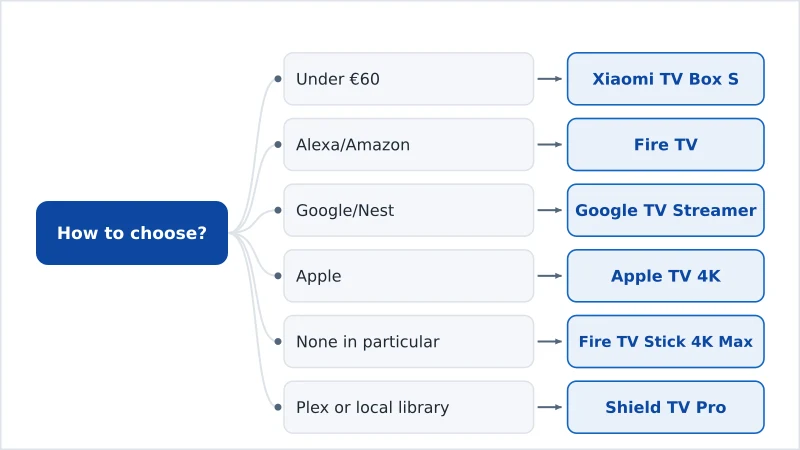
1. What’s your budget? Under €60 → Xiaomi TV Box S. €60–120 → Fire TV Stick 4K Max or Google TV Streamer. Money no object → Apple TV 4K or Shield TV Pro.
2. Which ecosystem do you live in? Alexa/Amazon → Fire TV. Google/Nest → Google TV Streamer. Apple → Apple TV 4K. None in particular → Fire TV Stick 4K Max wins on value.
3. Any special needs? Big local media library or Plex → Shield TV Pro. Smart-home hub in one box → Google TV Streamer (Thread/Matter). Hate ads → Apple TV 4K.
One final tip for European buyers: before ordering, open your national broadcaster’s website and check which platforms its app officially supports. App gaps — not hardware — are the most common reason people return streaming devices.
Our Verdict
For most people in Europe, the Amazon Fire TV Stick 4K Max is the best streaming device in 2026: fast, complete app coverage, and under €80. Enthusiasts with local media libraries should stretch to the NVIDIA Shield TV Pro, and Apple households will be happiest with the Apple TV 4K. Whatever you pick from this list, you’ll get certified 4K streaming with proper European app support — and that’s the bar that matters.