The best Kodi add-ons in 2026 all come from one place: the official Kodi repository, which is safe, vetted and legal. It covers legitimate streaming (YouTube, free services like Tubi, public broadcasters), media-server clients for Plex, Jellyfin and Emby, and utilities like weather and music. Third-party repos — the source of Kodi’s bad name — are best avoided entirely. This guide lists the official add-ons worth installing and why official is safer. For setup, see our Kodi setup guide and Kodi review.
Why Official Only
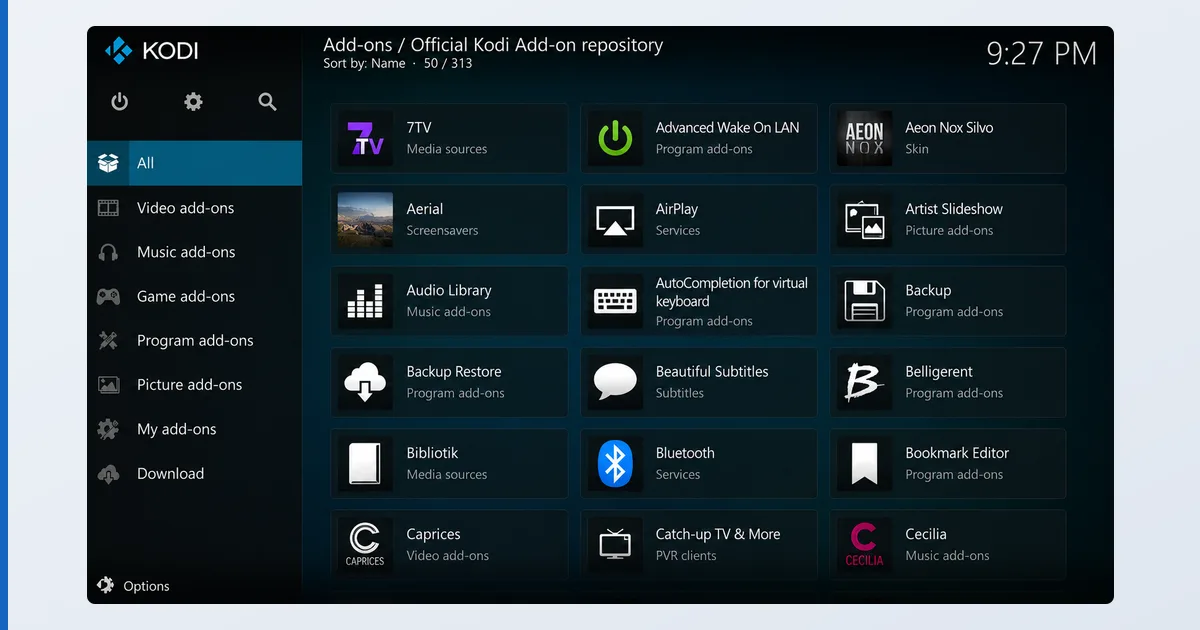
Kodi itself is a legitimate, legal media centre. Its reputation problems come from third-party add-ons and repositories, which can carry malware, break on updates, and stream pirated content. The official Kodi repository — built into Kodi, no extra URLs or “Unknown Sources” toggle — offers vetted, maintained add-ons for almost every legitimate need. Everything below installs from there, the safe way.
The Best Official Kodi Add-ons
| Add-on | Category | What it does |
|---|---|---|
| YouTube | Video | Full YouTube access with a proper TV interface |
| Plex | Video | Play your Plex server library in Kodi |
| Jellyfin for Kodi | Video | Connect to a Jellyfin server |
| Emby for Kodi | Video | Connect to an Emby server |
| Tubi | Video | Free, ad-supported films and TV (where available) |
| BBC iPlayer / ARTE | Video | Public-broadcaster catch-up (by country/availability) |
| Gaia / Music add-ons | Music | Stream music services and internet radio |
| Weather (e.g. OpenWeatherMap) | Weather | Local forecasts on your home screen |
Availability varies by country and changes over time — check the official repository for what’s live in your region.
How to Install (the Safe Way)
- From the home screen open Add-ons.
- Select the box icon → Install from repository.
- Choose the Kodi Add-on repository.
- Pick a category (Video, Music, Weather…) and install.
No third-party repo, no “Unknown Sources” — if a guide tells you to enable that, stop. See our Kodi setup guide for the full walkthrough.
Pair Kodi with a Media Server
Some of the most useful official add-ons are the media-server clients: connect Kodi to a Plex, Jellyfin or Emby server and browse your own library through Kodi’s interface. It’s the best of both worlds — a central media server plus Kodi’s customisation. See Kodi vs Plex for how the two approaches compare.
The Bottom Line
You don’t need risky third-party repos to get the most from Kodi. The official repository covers legitimate streaming (YouTube, Tubi, public broadcasters), your own media via Plex/Jellyfin/Emby clients, and handy utilities — all safe, vetted and legal. Install only from there. Set it up with our Kodi setup guide, read the full Kodi review, pick hardware in our best device for IPTV players guide, and look up any term in the streaming glossary.