| # | Product | Rating | Price | |
|---|---|---|---|---|
| 1 | Plex Media ServerBest Media Server (Polish) | Free · Plex Pass ≈ €5/mo or lifetime | Check Price |
Plex is the most polished media server in 2026: it organises your own films, shows and music into a Netflix-style library and streams it to apps on virtually every device, plus free ad-supported movies and live TV. The core is free; Plex Pass (≈ €5/month or a one-off lifetime fee) adds hardware transcoding, mobile downloads and DVR. Its trade-offs are some paywalled features and a reliance on Plex’s cloud sign-in. This review covers performance, value and who it’s for — part of our best IPTV players and streaming apps guide.
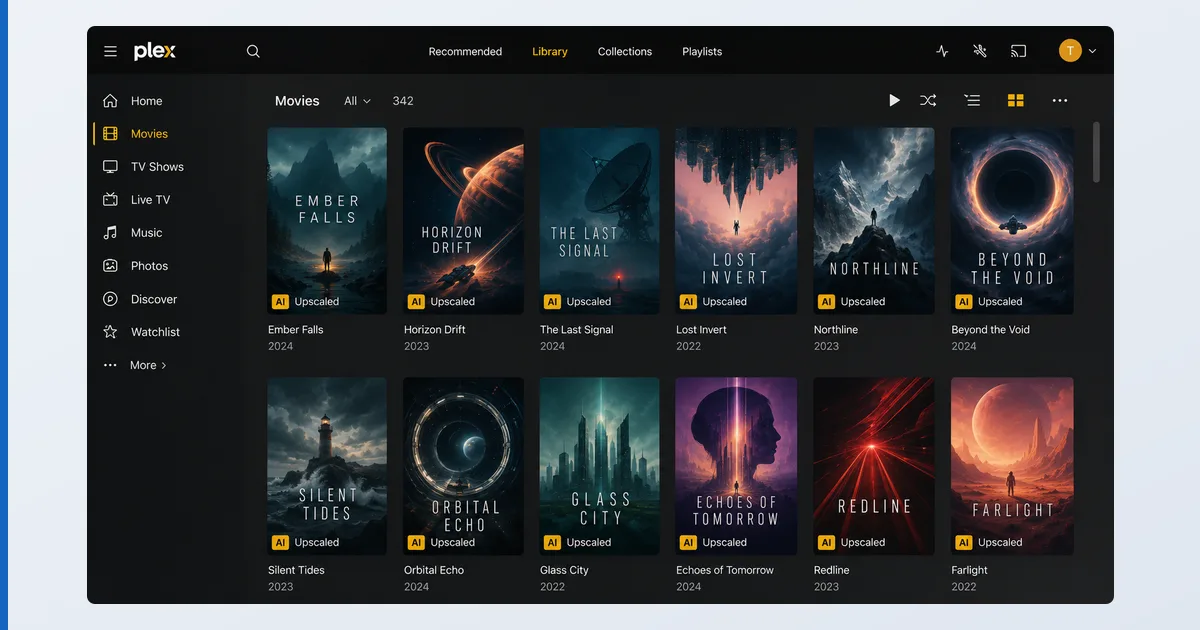
What Plex Is
Plex is a media server: you install the server on a computer or NAS, point it at your media folders, and it fetches artwork, metadata and subtitles to build a slick library — then streams it to Plex apps on your TV, phone or browser, at home or remotely. It also bundles a free, ad-supported catalogue of films, shows and live FAST channels. You supply your own media; Plex organises and serves it.
Specifications
| Feature | Detail |
|---|---|
| Server runs on | Windows, macOS, Linux, most NAS (Synology, QNAP) |
| Client apps | Fire TV, Android TV, Apple TV, smart TVs, iOS, Android, consoles, web |
| Your library | Films, TV, music, photos with auto metadata |
| Free extras | Ad-supported movies/TV + free live FAST channels |
| Transcoding | Software free; hardware-accelerated needs Plex Pass |
| Remote access | Yes (free), with optional relay |
| Price | Free · Plex Pass ≈ €5/mo, yearly, or lifetime one-off |
Using Plex
Setup is the easiest of any media server we tested: install, sign in, add folders, and within minutes your library appears with posters and descriptions. Across clients — Fire TV, Apple TV, iOS, web — the apps are consistent, fast and genuinely pleasant to use, which is Plex’s biggest edge over rivals.
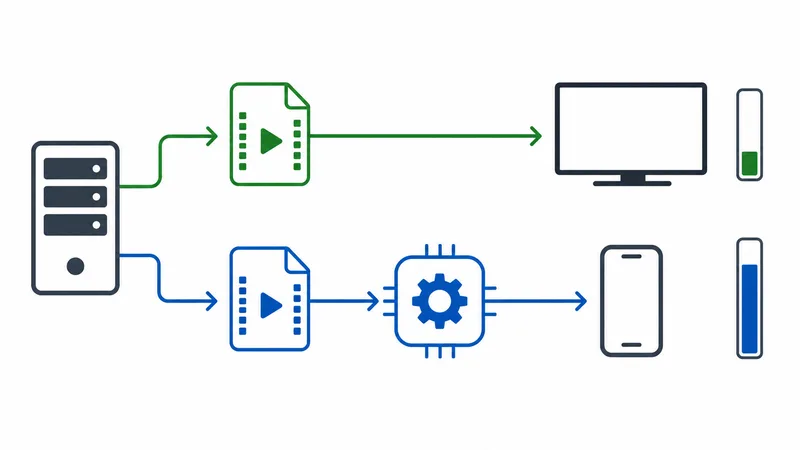
The key variable is transcoding. When a device can play your file directly, playback is instant and light on the server. When it can’t — an incompatible codec, or a slow remote connection — Plex converts on the fly, which is CPU-heavy. Hardware-accelerated transcoding, which offloads this to the GPU, requires Plex Pass; without it, a weak server can struggle with 4K. Store device-friendly formats and most playback stays direct.
✅ Pros
- The most polished apps, on nearly every device
- Effortless setup and automatic metadata
- Generous free tier plus free live TV and movies
- Reliable remote access built in
❌ Cons
- Hardware transcoding and mobile downloads need Plex Pass
- Relies on Plex's cloud for sign-in (an account is required)
- Some features increasingly nudged toward the paid tier
- 4K transcoding demands a capable server
Who It’s For
Plex is for anyone with a media collection who wants it to look and feel like a premium streaming service on every screen, with minimal fuss. It’s the best pick if you value polish, wide device support and easy remote access, and don’t mind an account or paying for Plex Pass to unlock the power features. If you want zero paywall and no cloud dependency, look at Jellyfin instead.
Alternatives
- Jellyfin — free, open-source, no paywall or cloud sign-in; rougher UX.
- Emby — a middle ground, part-open with some paid features.
- TiviMate — for live IPTV playlists rather than your own file library.
Price
Plex is free for your own library, remote access and the ad-supported catalogue. Plex Pass (≈ €5/month, cheaper yearly, or a one-off lifetime licence, observed Jul 2026) adds hardware transcoding, mobile/offline downloads, live TV DVR with a tuner, and early features. For heavy transcoders, the lifetime pass is the best long-term value.
Verdict
Plex is the most refined media server you can run, and the easiest to recommend to non-technical users: install it, and your own films and shows become a beautiful, Netflix-like library on every device, with free live TV thrown in. The caveats are the account requirement and the Plex Pass paywall around transcoding and downloads. If those don’t bother you, it’s excellent — if they do, Jellyfin is the free-and-open alternative. Pick the right hardware in our best device for Plex guide, understand the tech in our transcoding explainer, see the wider field in the best IPTV players and streaming apps guide, and look up any term in the streaming glossary.