Direct Play streams a media file to your device exactly as it is, using almost no server power, while transcoding converts the file on the fly — changing codec, resolution or bitrate — so an incompatible device can still play it. In media servers like Plex and Jellyfin, knowing which is happening explains stutter, quality loss and server load. This guide explains the difference, why transcoding kicks in, and how to keep playback on Direct Play.
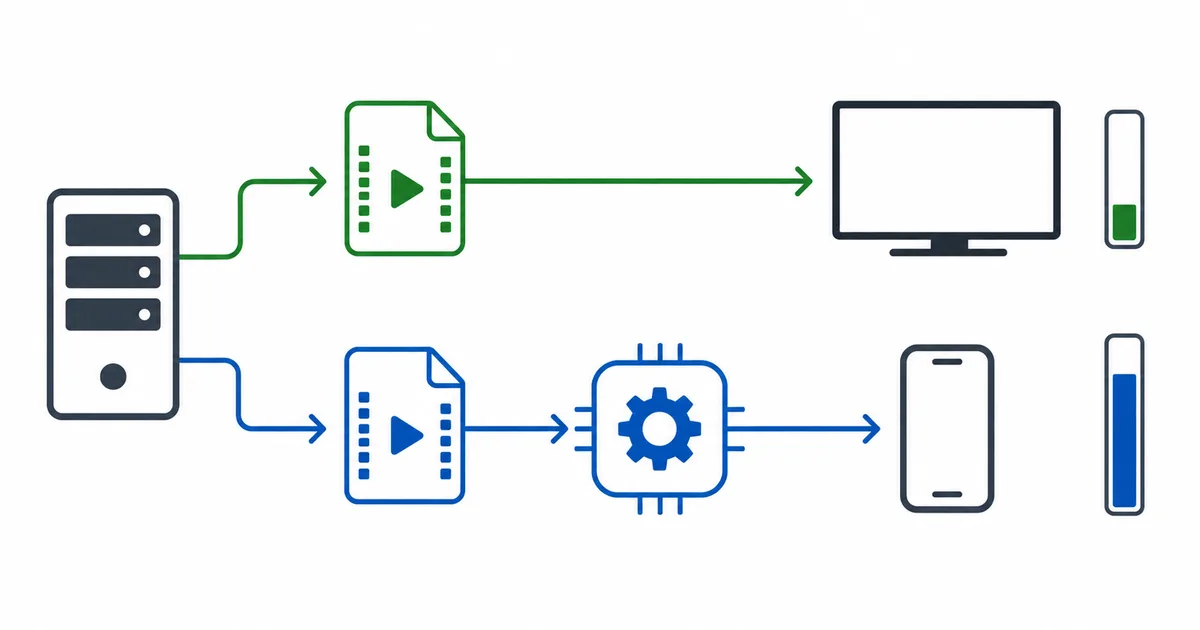
The Core Difference
When you play a file from Plex or Jellyfin, the server picks one of three paths:
- Direct Play — the file is sent untouched. The device plays the original exactly. Near-zero server load.
- Direct Stream — the container is repackaged but the video is not re-encoded (light work), often to fix a wrapper mismatch.
- Transcode — the server re-encodes the video and/or audio in real time to fit the device or connection. Heavy work.
Direct Play is ideal: best quality, least load. Transcoding is the fallback that makes otherwise unplayable files work — at a cost in server power and sometimes quality.
Why Servers Transcode
Transcoding kicks in when something about the file does not match your device or connection:
- Unsupported codec — the device cannot decode the original, e.g. HEVC/H.265 on older hardware.
- Resolution too high — a 4K file to a 1080p client.
- Bitrate over the limit — the file’s bitrate exceeds your bandwidth or a set quality cap.
- Incompatible audio — a surround format the device can’t handle.
- Subtitles burned in — image-based subtitles must be rendered into the video.
Any one of these forces a conversion. Remove the mismatch and playback can drop back to Direct Play.
Direct Play vs Transcoding
| Direct Play | Transcoding | |
|---|---|---|
| Server load | Minimal | High (CPU/GPU) |
| Quality | Original, untouched | Can be reduced |
| Compatibility | Needs a matching device | Works on almost anything |
| Best when | File matches device & bandwidth | Device or connection can’t handle the original |
| Multiple streams | Easy | Demands strong hardware |
The goal for most home setups is Direct Play whenever possible, with transcoding as the safety net for awkward files or remote viewing on limited bandwidth.
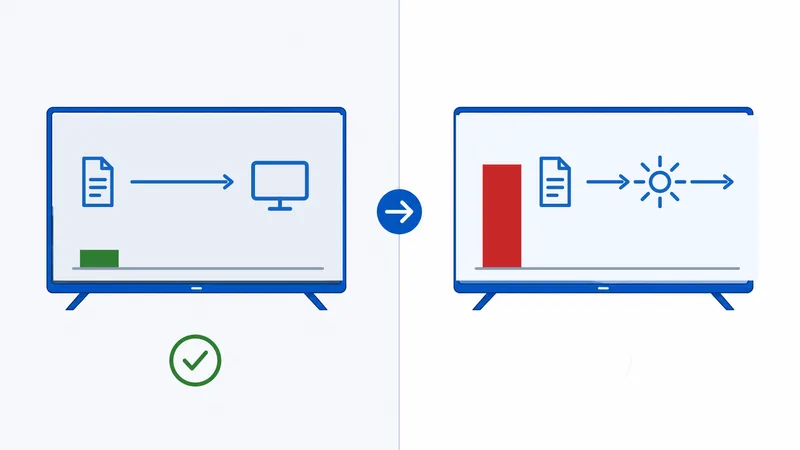
How to Avoid Transcoding
To keep playback on Direct Play:
- Use compatible files. Prefer codecs your devices support natively; a capable streaming device or player handles more formats.
- Set quality to Original / Maximum in the client, rather than a capped bitrate.
- Raise or remove bitrate limits on a fast local network (remote streaming may still need a cap).
- Use text-based subtitles (like SRT) that overlay without burning in; avoid image subtitles that force a transcode.
- Pick a strong player app — some clients support more codecs and containers, reducing conversions.
- Wire the server and main clients with Ethernet so bandwidth is never the trigger.
Diagnose it: both Plex and Jellyfin show whether a stream is Direct Play, Direct Stream or Transcode in their dashboard, and often why. Check there first — it tells you exactly which mismatch to fix.
Server Hardware and 4K
If you cannot always avoid transcoding — especially for 4K or many simultaneous viewers — hardware matters:
- CPU transcoding is heavy; a weak server struggles with even one 4K stream.
- Hardware acceleration using a compatible GPU transcodes far more efficiently, enabling multiple streams and 4K HDR.
- Plan for your worst case: how many people transcode at once, and at what resolution.
For a light setup where most content Direct Plays, a modest server is fine; heavy transcoding needs stronger hardware. More on the machine itself in what is a media server.
The Bottom Line
Direct Play sends your file untouched for the best quality and almost no server load, while transcoding re-encodes it on the fly so incompatible devices or limited connections can still play it — at the cost of CPU/GPU power and sometimes quality. Aim for Direct Play by matching files to devices, setting Original quality, using text subtitles and enough bandwidth. Keep transcoding as a safety net, and if you rely on it, invest in a GPU-accelerated server.
Next, understand the machine behind it in what is a media server, or the codecs involved in video codecs explained.
Not sure about a term on this page? Look it up in the streaming glossary.