A video codec is software that compresses video so it is small enough to stream, then decompresses it for playback — “codec” is short for coder-decoder. The three that matter for streaming are H.264 (AVC), H.265 (HEVC) and AV1: each newer generation squeezes the same picture into less data, but demands newer hardware to decode. This guide compares them on efficiency, quality, device support and battery, and explains which to use when.

What a Codec Does
Raw video is enormous — a few seconds of uncompressed 4K can be gigabytes. A codec makes it streamable by removing redundancy: areas of the picture that do not change between frames are not re-sent, and fine detail the eye barely notices is simplified. The amount of data kept per second is the bitrate.
Two things about a codec matter for you:
- Efficiency — how much quality it keeps per megabit. More efficient codecs look better on a slow connection.
- Decoding — your device must be able to decode the codec, ideally in dedicated hardware. Without it, playback falls back to the CPU, which drains battery and can stutter.
H.264 (AVC)
H.264, also called AVC, is the veteran. Released in 2003, it is supported by virtually every screen, browser and streaming device made since.
- Efficiency: the baseline everything else is measured against.
- Support: universal — the safest choice for compatibility.
- Best for: reliable playback everywhere, up to 1080p; older devices.
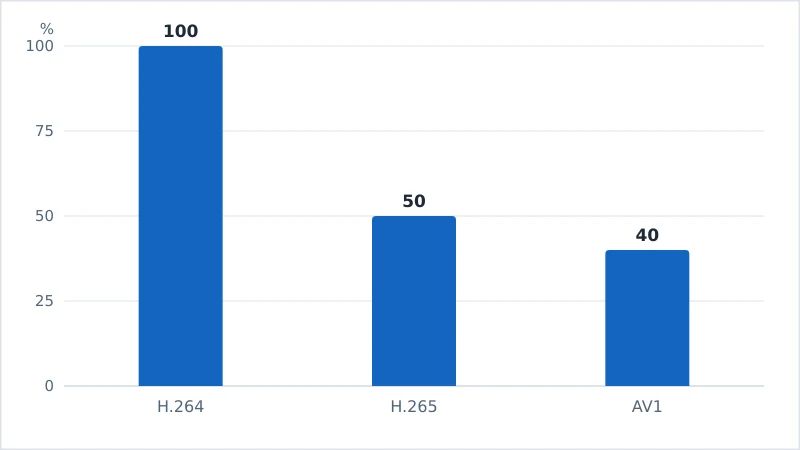
- Trade-off: needs roughly double the bitrate of H.265 for the same 4K quality.
H.265 (HEVC)
H.265, or HEVC, is H.264’s successor and roughly 40–50% more efficient — the same quality at about half the bitrate. That efficiency is what makes practical 4K and HDR streaming possible.
- Efficiency: about 2× better than H.264.
- Support: most devices from the last several years, but not all browsers.
- Best for: 4K and HDR on modern hardware.
- Trade-off: patent-licensing complexity, which slowed its adoption on the open web.
AV1
AV1 is the newest of the three, created by the Alliance for Open Media (Google, Netflix, Amazon and others). It is royalty-free and about 20–30% more efficient than H.265.
- Efficiency: the best of the three, especially at low bitrates.
- Support: only recent devices decode it in hardware; older ones fall back to power-hungry software decoding.
- Best for: efficient streaming to modern devices with no licensing cost.
- Trade-off: heavy to encode, and rough on older hardware’s battery.
Why big services love AV1: being royalty-free and highly efficient, it cuts both bandwidth bills and licensing fees — which is why YouTube and Netflix stream AV1 to devices that support it and fall back to H.264 for the rest.
Side-by-Side Comparison
| Codec | Released | Efficiency vs H.264 | Device support | Royalty-free? |
|---|---|---|---|---|
| H.264 (AVC) | 2003 | Baseline | Universal | No |
| H.265 (HEVC) | 2013 | ~40–50% better | Broad, modern devices | No |
| AV1 | 2018 | ~50–60% better | Recent devices only | Yes |
Which to Use
You rarely pick a codec by hand — services choose it and negotiate with your device. But the logic is:
- Need it to play anywhere? H.264.
- Streaming 4K/HDR to a modern TV or box? H.265.
- Want top efficiency on recent hardware, no royalties? AV1.
If a 4K stream stutters or your device runs hot, an unsupported codec forcing software decoding is a common cause — a newer streaming device with hardware AV1/HEVC decoding fixes it.
The Bottom Line
Codecs are the compression engine of streaming. H.264 is the universal baseline, H.265 roughly halves the bitrate for practical 4K and HDR, and AV1 pushes efficiency further while being royalty-free — provided your hardware can decode it. Newer is more efficient but demands newer silicon, which is exactly why services send the best codec each device can handle and fall back to H.264 for everything else.
Next, see how compression translates to picture quality in our guides to bitrate, resolution and HDR.
Not sure about a term on this page? Look it up in the streaming glossary.