Resolution is the number of pixels in a picture, and more pixels mean more potential detail and sharpness. Streaming resolutions run from 720p (HD) through 1080p (Full HD) and 4K (Ultra HD) up to 8K — but higher is not automatically better: the benefit depends on your screen size, viewing distance, connection speed and the stream’s bitrate. This guide explains each resolution, what it needs, and where the sweet spot really is.
What Resolution Means
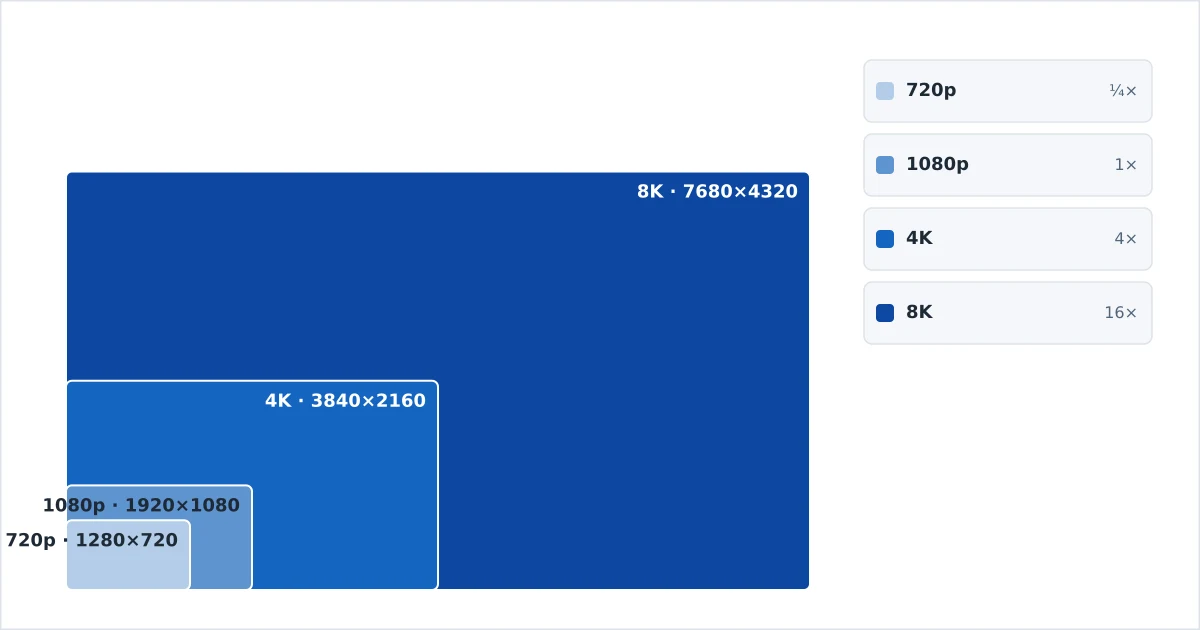
Resolution is written as width × height in pixels (e.g. 1920×1080) or, more commonly, by its vertical line count with a “p” for progressive scan (e.g. 1080p). More pixels give a sharper, more detailed image — if the screen is big enough and close enough for your eyes to resolve them, and if the stream has enough bitrate to fill them.
That last point matters: resolution and bitrate are separate. A 4K picture with too little data can look worse than a well-encoded 1080p one. Resolution sets the potential detail; bitrate and codec decide how much of it survives.
The Resolutions, Explained
- 720p (HD) — 1280×720. The entry point for “HD.” Fine for small screens, phones and weak connections; soft on a large modern TV.
- 1080p (Full HD) — 1920×1080. The mainstream standard: crisp on most TVs and the best balance of quality and bandwidth for many homes.
- 1440p (QHD) — 2560×1440. Common on monitors and some content, between Full HD and 4K; less common for TV streaming.
- 4K (Ultra HD) — 3840×2160. Four times the pixels of 1080p. The premium standard for large TVs, and where HDR usually lives.
- 8K — 7680×4320. Four times the pixels of 4K. Impressive on paper, but content is scarce and the benefit is minimal at normal distances.
Resolution Comparison Table
| Resolution | Pixels | vs 1080p | Recommended speed | Best screen size |
|---|---|---|---|---|
| 720p (HD) | 1280×720 | ¼ | ~10 Mbps | Phones, small TVs |
| 1080p (Full HD) | 1920×1080 | 1× | 15–25 Mbps | Up to ~43” |
| 4K (Ultra HD) | 3840×2160 | 4× | 25 Mbps+ | 50”+ |
| 8K | 7680×4320 | 16× | 50–100 Mbps+ | 75”+ (niche) |
Speeds are per stream; efficient codecs like H.265 and AV1 can hit the lower end. See the full breakdown in our internet speed guide.
Screen Size and Distance
Resolution only pays off when your eyes can actually resolve the extra pixels. Two factors decide that:
- Screen size. The bigger the screen, the more the pixels spread out, so higher resolution helps more.
- Viewing distance. The closer you sit, the more detail you can see. From across a room, 4K and 1080p converge.
As a rough guide, 4K’s advantage over 1080p becomes clear on a 50-inch or larger TV at a typical living-room distance. On a phone or a small bedroom TV, 1080p is usually indistinguishable from 4K and saves a lot of data.
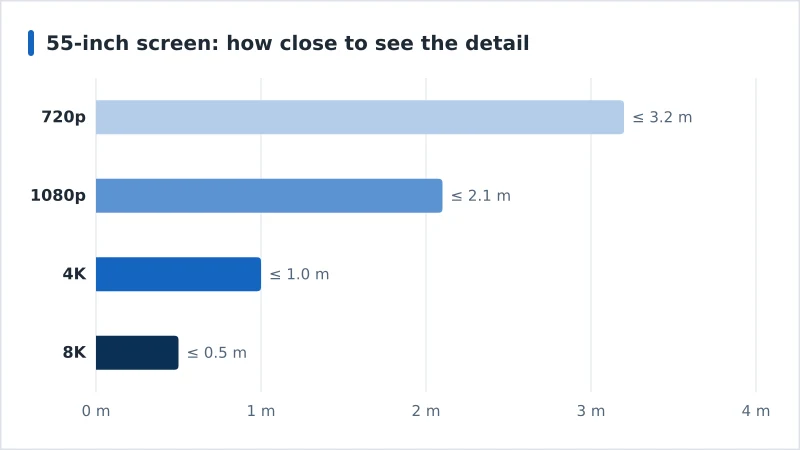
On a 55-inch screen — the most common living-room size — each step’s extra detail is only resolvable within roughly these distances:
- 720p: up to 3.2 m
- 1080p: up to 2.1 m
- 4K: up to 1.0 m
- 8K: up to 0.5 m
These figures assume a 55-inch 16:9 screen and normal eyesight, measured from the screen to your eyes, and they scale with screen size — a bigger TV pushes every distance further out. They are stricter than the rule of thumb above because they mark where the full pixel detail is still resolvable, not where the picture stops looking good.
Which Resolution to Choose
- Phone or small TV, or limited data: 720p–1080p. You will not see 4K’s benefit, and you save bandwidth.
- Main living-room TV (43–55”), good connection: 1080p or 4K — 4K if the TV and content support it.
- Large TV (55”+), 25 Mbps+, capable device: 4K, ideally with HDR.
- 8K: skip it for now unless you have a very large screen and specifically want it; content is minimal.
If 4K stutters, the limit is usually your connection or an older device — our best streaming devices guide covers hardware that decodes 4K smoothly.
The Bottom Line
Resolution is the pixel count, scaling from 720p up to 8K, and each step up multiplies both detail and bandwidth. But it only helps when your screen is large enough, you sit close enough, and the stream carries enough bitrate. For most homes, 1080p is the efficient sweet spot and 4K is the worthwhile premium on a big TV — while 8K remains a niche with little to watch.
Next, understand the data behind the pixels in our bitrate guide, and how colour and brightness improve in HDR explained.
Not sure about a term on this page? Look it up in the streaming glossary.