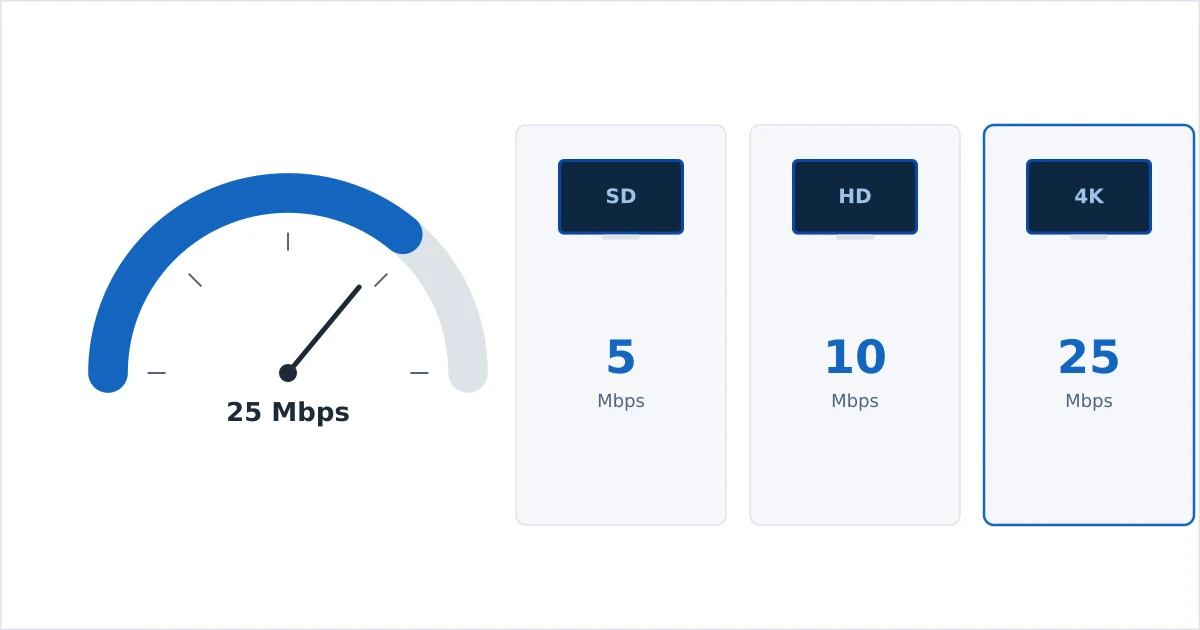
For a single stream, plan on roughly 5 Mbps for SD, 10 Mbps for 720p, 15–25 Mbps for 1080p and 25 Mbps or more for 4K. These are per-stream figures, so a household needs the sum of everything playing at once — two 4K streams want about 50 Mbps, plus headroom for phones, gaming and video calls. This guide gives exact numbers by quality, by service and by household size, and explains why a stable connection often matters more than a fast one.
Speed by Video Quality
Higher resolution means more data per second, so it needs more bandwidth. These are safe per-stream targets, including a margin above the bare minimum:
| Quality | Resolution | Typical bitrate | Recommended speed (per stream) |
|---|---|---|---|
| SD | 480p | 1–3 Mbps | 5 Mbps |
| HD | 720p | 3–5 Mbps | 10 Mbps |
| Full HD | 1080p | 5–8 Mbps | 15–25 Mbps |
| 4K UHD | 2160p | 15–25 Mbps | 25 Mbps+ |
The gap between “bitrate” and “recommended speed” is deliberate headroom. Streaming needs spare capacity above the raw video rate to buffer ahead and absorb momentary dips — running a 4K stream on exactly 15 Mbps invites constant re-buffering. To understand where these bitrates come from, see how streaming actually works.
Speed by Service
Individual services publish their own recommendations, and they line up closely with the tiers above:
| Service | Recommended for HD | Recommended for 4K |
|---|---|---|
| Netflix | 5 Mbps | 15 Mbps |
| Disney+ | 5 Mbps | 25 Mbps |
| Prime Video | 5 Mbps | 15 Mbps |
| YouTube (per stream) | 5–7 Mbps | 20 Mbps |
| Live sport / IPTV | 8–10 Mbps | 25 Mbps+ |
Note: live sport and IPTV often want a touch more than on-demand apps. Fast motion is harder to compress, so live channels push higher bitrates to stay sharp — build in extra margin if you watch a lot of live football or racing.
Speed by Household Size
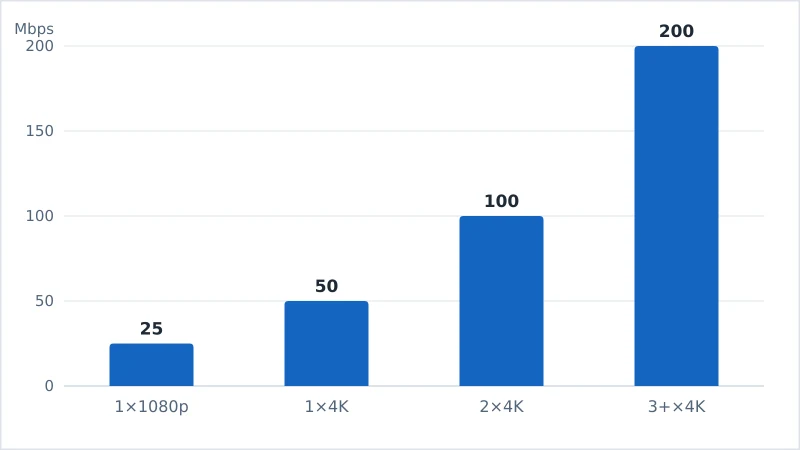
Because requirements are per stream, plan for what happens when everyone is online at once. These plan sizes leave room for background traffic, gaming and video calls:
| Household | Typical simultaneous use | Comfortable plan |
|---|---|---|
| 1 person, HD | One 1080p stream | 25 Mbps |
| 1–2 people, some 4K | One 4K + a phone | 50 Mbps |
| Family, mixed use | Two 4K + phones + gaming | 100 Mbps |
| Heavy / large household | Three+ 4K + calls + downloads | 200 Mbps+ |
Why Stability Beats Speed
A common surprise: people on fast plans still buffer, while others stream flawlessly on modest ones. The reason is that streaming rewards a stable, consistent connection more than a big headline number.
- Latency and jitter — sudden delays or an unstable path drain the player’s buffer even when average speed looks fine.
- Packet loss — a weak Wi-Fi signal forces retransmissions, which stalls playback.
- Peak-time congestion — your effective speed at 9pm can be a fraction of the midday figure.
A steady 25 Mbps wired line typically streams 4K better than an erratic 100 Mbps Wi-Fi signal that dips whenever the microwave runs. When you test your speed, run it a few times, including in the evening, to see your real sustained figure rather than a best case.
Fixing Buffering
If streams buffer despite an adequate plan, work through these in order of impact:
- Go wired where you can. Ethernet on the main TV removes Wi-Fi as a variable — see our Fire TV setup guide for wired options.
- Improve the Wi-Fi. Use 5 GHz, move the router closer or higher, and reduce obstacles.
- Restart the router. Clears congestion and stale connections.
- Close background apps and downloads. Large updates and cloud backups compete for bandwidth.
- Lower the quality manually if a device is old, or upgrade the streaming device itself.
- Check for throttling. If speeds are fine except when streaming, a VPN can reveal whether your ISP is throttling video.
The Bottom Line
Think per stream, then add up your household: 5 Mbps for SD, 10 for 720p, 15–25 for 1080p, and 25 Mbps or more for each 4K stream. A single 4K viewer is comfortable on 50 Mbps; a busy family wants around 100 Mbps. Above all, prioritise a stable, ideally wired connection — consistency prevents far more buffering than a bigger number on your bill.
For the mechanics behind these figures, read how streaming actually works; to get started from scratch, see what IPTV is.
Not sure about a term on this page? Look it up in the streaming glossary.