| # | Product | Rating | Price | |
|---|---|---|---|---|
| 1 | Emby Media ServerBest Middle-Ground Server | Free · Premiere ≈ €5/mo or lifetime | Check Price |
Emby is the media server that sits between Plex and Jellyfin — more configurable than Plex, more polished than Jellyfin, with strong live TV and DVR support. You install the server, point it at your media, and stream a tidy library to apps on every device, with a paid Premiere tier for hardware transcoding, downloads and DVR. It’s the pick if Plex’s cloud direction bothers you but Jellyfin feels too DIY. This review covers what it does, how it performs, and who it’s for — part of our best IPTV players and streaming apps guide.
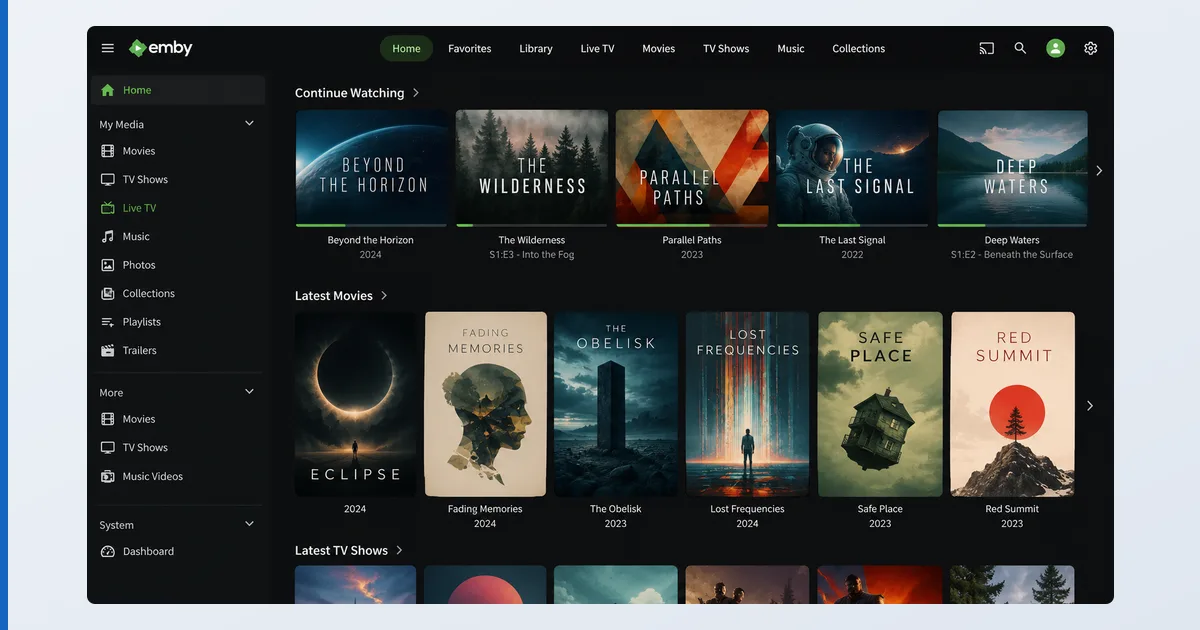
What Emby Is
Emby is a media server: install it on a computer or NAS, point it at your media folders, and it builds a library with artwork and metadata, streamed to apps on your TV, phone or browser. It’s the codebase Jellyfin forked from in 2018 — so it feels familiar — but Emby kept a paid Premiere tier and a partly closed codebase in exchange for more polish and stronger live TV/DVR. You supply your own media; Emby organises and serves it.
Specifications
| Feature | Detail |
|---|---|
| Server runs on | Windows, macOS, Linux, most NAS (Synology, QNAP) |
| Client apps | Fire TV, Android TV, Apple TV, Samsung/LG TVs, iOS, Android, web |
| Your library | Films, TV, music, photos with auto metadata |
| Live TV / DVR | Yes, with a compatible tuner + antenna (a strength) |
| Transcoding | Software free; hardware-accelerated needs Premiere |
| Price | Free tier · Premiere ≈ €5/mo, yearly, or lifetime one-off |
Using Emby
Setup mirrors Plex and Jellyfin: install, add libraries, let metadata populate. In testing on a Fire TV Stick 4K Max, the official apps were noticeably more polished than Jellyfin’s and close to Plex’s, with responsive navigation and reliable subtitle handling. Emby’s live TV and DVR stood out: with a tuner attached, the EPG and scheduled recording worked cleanly — better out of the box than most rivals.
| Emby | Plex | Jellyfin | |
|---|---|---|---|
| App polish | Polished official apps, close to Plex's | Slicker apps, bigger community | Rougher UX |
| Cost | Free tier · Premiere ≈ €5/mo, yearly, or lifetime one-off | Broadly similar pricing model | Fully free, no paywall |
| Openness | Partly open codebase, more control | More cloud-tied | Fully open-source |
| Live TV / DVR | Excellent with a tuner — a strength | Bundled free movies/live channels | Less strong out of the box |
| Hardware transcoding | Needs Emby Premiere | Broadly similar model | No paywall — included |
The familiar variable is transcoding. Direct play is light; on-the-fly conversion is CPU-heavy, and hardware acceleration requires Emby Premiere. Without Premiere, full playback on mobile apps and some TV clients is also gated. Store device-friendly formats and most playback stays direct.
✅ Pros
- Polished official apps on nearly every platform
- Excellent live TV and DVR with a tuner
- More configurable and less cloud-tied than Plex
- Lifetime Premiere option for long-term value
❌ Cons
- Hardware transcoding and full app playback need Premiere
- Partly closed source — not fully open like Jellyfin
- Smaller community than Plex or Jellyfin
- No bundled free movies/live channels like Plex
Who It’s For
Emby is for users who want Plex-level polish with more control and strong DVR, and don’t mind paying for Premiere. It’s ideal if Plex’s cloud direction and content push bother you, but Jellyfin’s rough edges put you off. It’s not the pick if you want a totally free, open server (choose Jellyfin) or the biggest app ecosystem and bundled free content (choose Plex).
Alternatives
- Plex — slicker apps, bigger community, bundled free TV; more cloud-tied.
- Jellyfin — free and open-source with no paywall; rougher UX.
- TiviMate — for live IPTV playlists rather than your own file library.
Price
Emby’s free tier streams your library on the web and many devices. Emby Premiere (≈ €5/month, cheaper yearly, or a one-off lifetime licence, observed Jul 2026) unlocks hardware transcoding, mobile app playback, offline downloads, DVR and cover-art extras. For long-term users, the lifetime licence is the best value — much like Plex’s model.
Verdict
Emby is a genuinely strong middle ground: it does almost everything Plex does with a bit more control and excellent DVR, while feeling more polished than Jellyfin. The costs are Premiere for the power features and a partly closed codebase. If you want polish plus control and value good live TV, it’s an easy recommendation; purists wanting fully open software should still pick Jellyfin. Choose hardware in our best device for Plex guide (the same devices run Emby), understand the tech in our transcoding explainer, see the field in the best IPTV players and streaming apps guide, and look up any term in the streaming glossary.