| # | Product | Rating | Price | |
|---|---|---|---|---|
| 1 | IPTV Smarters ProBest Cross-Platform IPTV Player | Free (provider-branded builds vary) | Check Price |
IPTV Smarters Pro is the best cross-platform IPTV player in 2026 — a free app that plays live TV from your own M3U or Xtream playlist on Android, Fire TV, iOS, iPadOS and Windows alike. It provides no channels itself; you point it at a service you subscribe to. It’s less polished than TiviMate but wins on reach — especially Apple support, which TiviMate lacks. This review covers what it does, how it performs, and who it’s for — part of our best IPTV players and streaming apps guide.
What IPTV Smarters Is
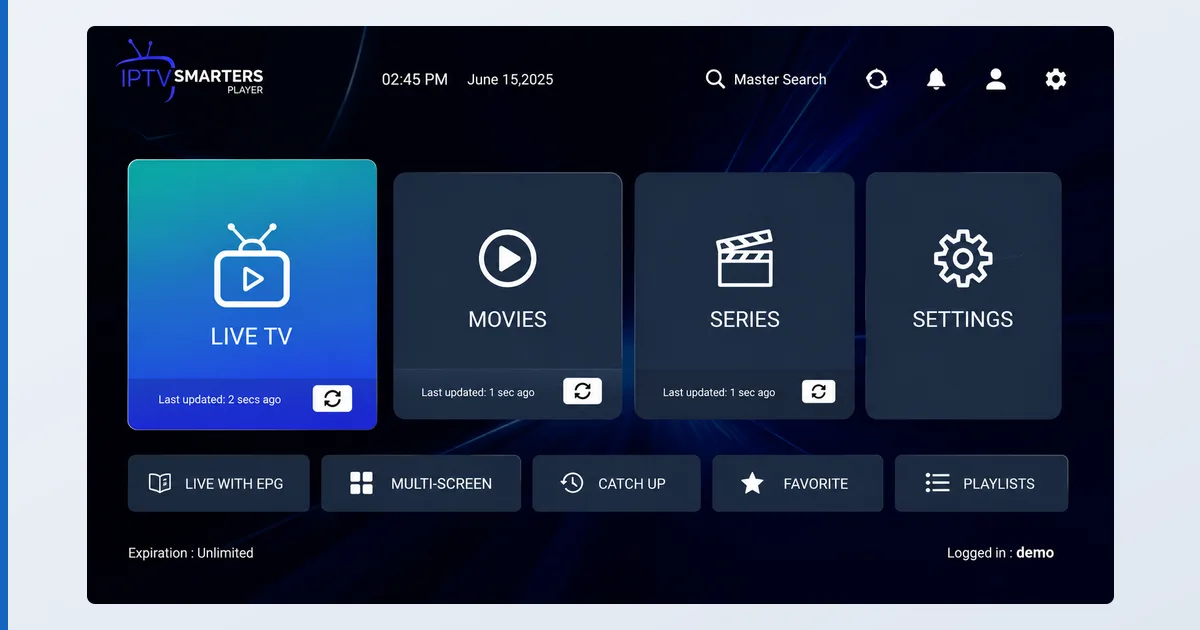
IPTV Smarters Pro is a live-TV IPTV player available across nearly every platform. You give it a playlist — an M3U file or an Xtream Codes login from a service you subscribe to — and it presents Live TV, Movies and Series sections with an EPG and catch-up. It ships with no content of its own; it’s a neutral tool, and what you watch depends on your provider’s playlist, which is your responsibility.
Specifications
| Feature | Detail |
|---|---|
| Platforms | Android, Fire TV, Android TV, iOS, iPadOS, Windows |
| Playlist formats | M3U / M3U8, Xtream Codes API |
| EPG | XMLTV programme guide |
| Catch-up | Yes, where the provider supports it |
| Layout | Live TV / Movies / Series sections (VOD-aware) |
| Branding | Free app + provider-branded builds exist |
| Price | Free |
Using IPTV Smarters
Setup is quick: enter an Xtream login or M3U URL and the app populates Live TV, Movies and Series automatically — the VOD-aware layout is handy if your provider offers on-demand as well as channels. In testing across a Fire TV Stick 4K Max, an Android phone and an iPad, the same interface and playlist worked on all three, which is the app’s real selling point. Playback of M3U and Xtream sources was stable, and catch-up worked where the provider supported it.
| Feature | IPTV Smarters | TiviMate |
|---|---|---|
| Platforms | Android, Fire TV, Android TV, iOS, iPadOS, Windows | Android and Fire TV (no iOS) |
| iOS / iPadOS | Yes | No |
| EPG and polish | More basic EPG and channel grid | More polished, cable-like EPG and interface |
| Price | Free | — |
Where it trails TiviMate is polish: the EPG and channel-grid experience is more basic, and navigation is less refined. It’s also worth noting that many providers ship their own branded Smarters builds — functionally similar, but download only from sources you trust.
✅ Pros
- Genuinely cross-platform — including iOS, iPadOS and Windows
- Free, with Live TV / Movies / Series (VOD-aware) layout
- Solid M3U and Xtream support with EPG and catch-up
- Same app and playlist across Apple and Android
❌ Cons
- Less polished EPG and UI than TiviMate
- No content included — you must supply a playlist
- Many unofficial provider-branded builds to sift through
- Feature depth trails dedicated Android players
Who It’s For
IPTV Smarters is for households mixing Apple and Android devices who want one IPTV player everywhere, with a legitimate subscription or legal M3U. It’s ideal if you need the app on an iPhone or iPad, where TiviMate can’t go. It’s not the best pick if you’re Android-only and want the most polished experience (choose TiviMate or OTT Navigator), or if you expect bundled content — it never provides any.
Alternatives
- TiviMate — the most polished Android/Fire TV IPTV player (no iOS).
- OTT Navigator — deep customisation on Android.
- VLC — for quickly testing a stream, without a full EPG.
Price
The core IPTV Smarters Pro app is free, with no subscription for the app itself. A separate paid reseller platform exists for IPTV businesses, and providers often distribute free branded builds, but end users pay nothing for the player — only for their own IPTV subscription, which supplies the channels.
Verdict
IPTV Smarters earns its place through reach: it’s the IPTV player that runs the same way on an iPhone, an iPad, an Android box and a Windows PC, for free. It’s not as refined as TiviMate on Android TV, so single-platform users have better options — but for mixed Apple-and-Android homes with a legal playlist, nothing matches its consistency. Pick the right hardware in our best device for IPTV players guide, see how it compares in the best IPTV players and streaming apps guide, and look up any term in the streaming glossary.