| # | Product | Rating | Price | |
|---|---|---|---|---|
| 1 | OTT Navigator IPTVMost Customisable IPTV Player | Free trial · Premium ≈ €1–2/mo or lifetime | Check Price |
OTT Navigator is one of the most flexible IPTV players for Android TV and Fire TV in 2026 — a highly customisable app for watching live TV from your own M3U or Xtream playlist. Like any IPTV player, it provides no channels itself; you point it at a service you subscribe to. It rivals TiviMate, trading a little simplicity for deeper customisation, and its Premium licence is cheap. This review covers what it does, how it performs, and who it’s for — part of our best IPTV players and streaming apps guide.
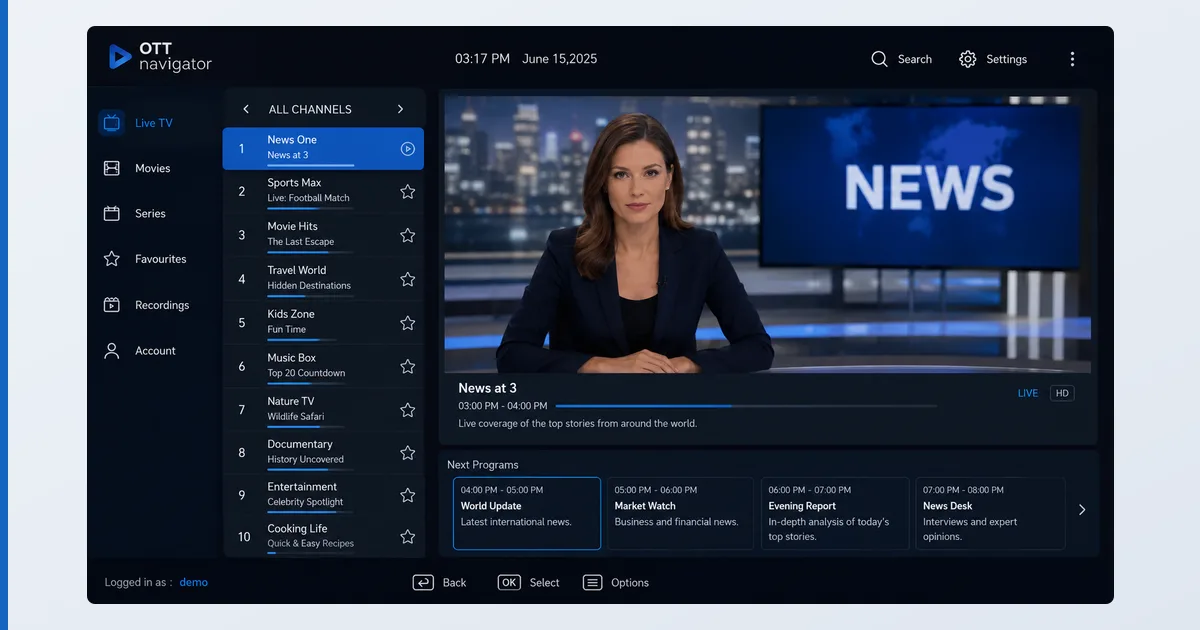
What OTT Navigator Is
OTT Navigator is a live-TV IPTV player for Android-based devices. You give it a playlist — an M3U file or an Xtream Codes login from a service you subscribe to — and it turns that into a customisable, cable-like experience with a proper EPG, catch-up and recording. It ships with no content of its own; it’s a neutral tool, and what you watch depends on your provider’s playlist, which is your responsibility.
Specifications
| Feature | Detail |
|---|---|
| Platforms | Android TV, Google TV, Fire TV, Android phone/tablet |
| Not available on | iOS, Apple TV, Windows, web |
| Playlist formats | M3U / M3U8, Xtream Codes API |
| EPG | XMLTV, catch-up/archive where provider supports it |
| Recording | Yes |
| Customisation | Extensive — layouts, themes, per-playlist settings |
| Price | Free trial · Premium ≈ €1–2/mo or lifetime |
Using OTT Navigator
Setup mirrors other IPTV players: add a playlist URL, let the EPG load, and you get a responsive channel list and programme grid. Where OTT Navigator stands out is customisation — layouts, themes, category handling and per-playlist settings go deeper than most rivals, letting you tailor the interface precisely. In testing on a Fire TV Stick 4K Max, playback of M3U and Xtream sources was stable, catch-up worked where the provider supported it, and multi-playlist handling was smooth.
| Feature | OTT Navigator | TiviMate |
|---|---|---|
| Customisation | Extensive — layouts, themes, per-playlist settings | Clean, cable-like interface |
| Ease of use | More menus and options — newcomers may find it busy | The pick for simplicity |
| EPG | XMLTV | Yes |
| Catch-up and recording | Yes, where the provider supports it | Yes |
| Price | Free trial · Premium ≈ €1–2/mo or lifetime | Premium licence |
The trade-off versus TiviMate is simplicity: OTT Navigator’s flexibility means more menus and options, which power users love and newcomers may find busy. EPG accuracy, as always, depends on your provider’s data, not the app. On lower-powered devices, very large playlists can slow the guide slightly.
✅ Pros
- Deep customisation — layouts, themes, per-playlist settings
- Strong M3U/Xtream support with EPG, catch-up and recording
- Very cheap Premium, with a lifetime option
- Stable playback of varied provider setups
❌ Cons
- Android-only — no iOS, Apple TV, Windows or web
- More complex than TiviMate for beginners
- No content included — you must supply a playlist
- Large playlists can lag on low-end devices
Who It’s For
OTT Navigator is for Android TV or Fire TV users with a legitimate IPTV subscription or their own legal M3U who want maximum control over the interface. It’s ideal if you like tweaking layouts and handling multiple playlists. It’s not the pick if you want the simplest possible setup (TiviMate is cleaner), if you’re on Apple or Windows (it’s Android-only), or if you expect the app to provide content — it never does.
Alternatives
- TiviMate — the cleaner, simpler premium IPTV player on Android.
- Kodi — a full media centre with PVR/IPTV add-ons.
- VLC — for quickly testing a stream, though without a proper EPG.
Price
OTT Navigator offers a free trial, then a Premium licence — monthly, yearly, or a one-off lifetime purchase, at roughly €1–2/month equivalent (observed Jul 2026). It’s among the cheapest premium IPTV players, and the lifetime option is excellent value for regular use. As with any IPTV player, you pay for the app only — never for channels, which come from your own provider.
Verdict
OTT Navigator is a top-tier IPTV player for people who want to customise everything: deep layout control, strong format support, catch-up and recording, at a trivial price. Its limits are platform (Android-only) and a busier interface than TiviMate, which remains the pick for simplicity. If you have a legal playlist and enjoy tailoring your setup, OTT Navigator is an excellent, cheap choice. Pick the right hardware in our best device for IPTV players guide, see how it compares in the best IPTV players and streaming apps guide, and look up any term in the streaming glossary.