An EPG (Electronic Program Guide) is the on-screen television schedule that shows what’s playing now and next across your channels, with titles, times, descriptions and categories in a scrollable grid. It is the digital replacement for printed TV listings, and it lets you browse the schedule, read programme details and often set reminders or recordings. This guide explains how an EPG works, the XMLTV format behind it, and how to set one up.
What an EPG Does
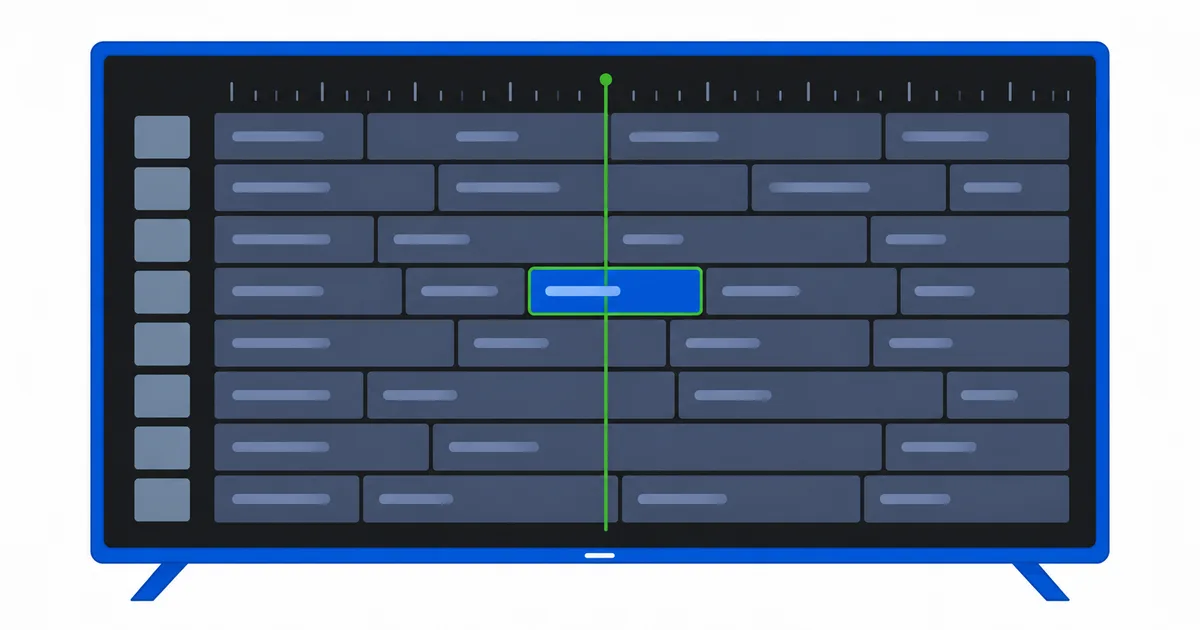
An EPG is the interactive schedule layered on top of your channels. At a glance it typically shows:
- Now and next — what is currently playing and what follows on each channel.
- A timeline grid — channels down one side, a scrollable time axis across the top.
- Programme details — title, start and end time, a synopsis, and often a genre or age rating.
- Actions — set a reminder, start-over a live programme, or schedule a recording where supported.
Without an EPG, an IPTV channel list is just a set of names. The EPG is what makes it feel like real television, with a proper guide you can plan your evening around.
How an EPG Works
An EPG is separate data from your channel list, and the two are joined together by the player.
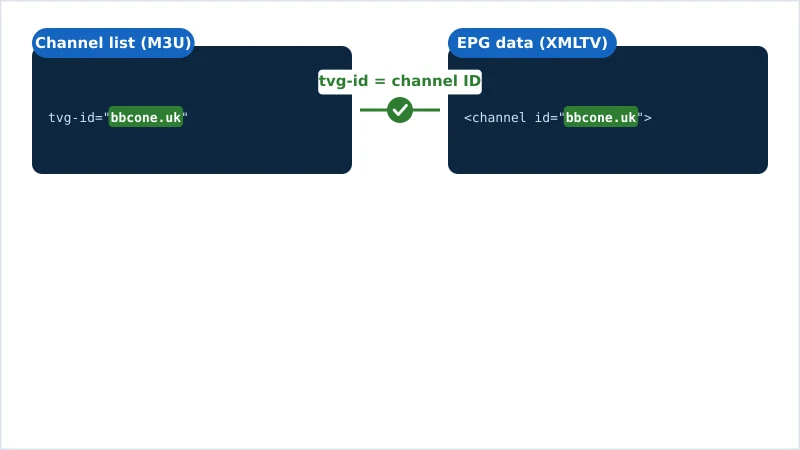
- The channel list — usually an M3U playlist — defines which channels exist and where each stream lives. Every channel carries an identifier called
tvg-id. - The EPG data — an XMLTV file — lists programmes and their times, each tied to a channel ID.
- The match — your player links a channel to its schedule when the playlist’s
tvg-idequals the channel ID in the EPG file.
That shared ID is the whole trick. When it lines up, every channel shows its schedule; when it does not, the guide stays blank — which is the single most common EPG problem.
The XMLTV Format
Almost all IPTV EPGs use XMLTV, an open XML format for TV listings. An XMLTV file has two kinds of entries: channel definitions and programme entries.
<channel id="bbcone.uk">
  <display-name>BBC One</display-name>
</channel>
<programme start="20260723183000 +0000" stop="20260723190000 +0000" channel="bbcone.uk">
  <title>Evening News</title>
  <desc>The day's top stories and weather.</desc>
</programme>
Two details matter in practice:
- The
channelID must match your playlist’stvg-id. In the example, both arebbcone.uk. This is the link that makes the guide appear. - Times include a time zone (
+0000above). If your player’s time zone is set wrong, programmes appear shifted by hours.
EPG files are often served gzip-compressed as .xml.gz to save bandwidth, since a full week of listings for hundreds of channels is large. Players decompress them automatically.
How to Set Up an EPG
Adding an EPG is a short, one-time job in most players:
- Get the EPG URL. Your licensed source provides an XMLTV link (
.xmlor.xml.gz). - Open your player’s EPG settings. In apps like TiviMate or IPTV Smarters, look for “EPG” or “Guide.”
- Paste the URL and save.
- Let it download. The first refresh can take a minute for large guides.
- Set the refresh interval and time zone. A daily auto-refresh keeps the guide current; the correct time zone keeps programmes aligned.
For an app-specific walkthrough, follow our TiviMate setup guide, and see how the playlist side fits together in what an M3U playlist is.
Tip: Use an EPG source that is built for your channel list, so its channel IDs already match your playlist's tvg-ids. Mixing a playlist and an unrelated EPG is the main reason guides show up empty.
Fixing a Broken EPG
If your guide is blank, wrong, or shifted in time, work through these in order:
| Symptom | Likely cause | Fix |
|---|---|---|
| Guide completely empty | tvg-id ≠ EPG channel id | Align the IDs, or use a matching EPG source |
| Some channels have no guide | Those channels lack a tvg-id | Add the correct tvg-id to those playlist entries |
| Times are hours off | Wrong time zone in the app | Set your correct time zone in settings |
| Guide stopped updating | Expired URL or no auto-refresh | Update the EPG URL; enable daily refresh |
| Old data after changes | Cached guide | Force an EPG refresh / clear the app’s guide cache |
Most EPG problems come down to that tvg-id match. Get the IDs aligned and the rest usually falls into place.
The Bottom Line
An EPG is the interactive schedule that turns a plain channel list into real television — now-and-next, a browsable grid, and programme details. Behind the scenes it is an XMLTV file, joined to your channels by a shared tvg-id. Paste the right EPG URL into your player, match your IDs, set the correct time zone, and you get a full, self-updating guide.
Next, understand the channel-list side in what an M3U playlist is, or start from the basics with what IPTV is.
Not sure about a term on this page? Look it up in the streaming glossary.