| # | Product | Rating | Price | |
|---|---|---|---|---|
| 1 | Intel N100 Mini PCBest Overall (Quick Sync) | ≈ €150–200 | Check Price | |
| 2 | Synology NAS (4-bay)Best for Storage | ≈ €400+ (diskless) | Check Price | |
| 3 | Raspberry Pi 5Cheapest (Direct Play) | ≈ €80–100 | Check Price |
The best Plex server hardware in 2026 is an Intel N100 mini PC for most people: cheap, low-power and a strong hardware transcoder thanks to Intel Quick Sync. Choose a NAS if you also need lots of redundant storage, a Raspberry Pi if you only ever direct-play, or repurpose an old PC to start free. The right pick hinges on transcoding. This guide ranks the options by power, streams and budget, with a hardware table. For the software side, see our Plex review and Plex setup guide.
What Actually Matters: Transcoding
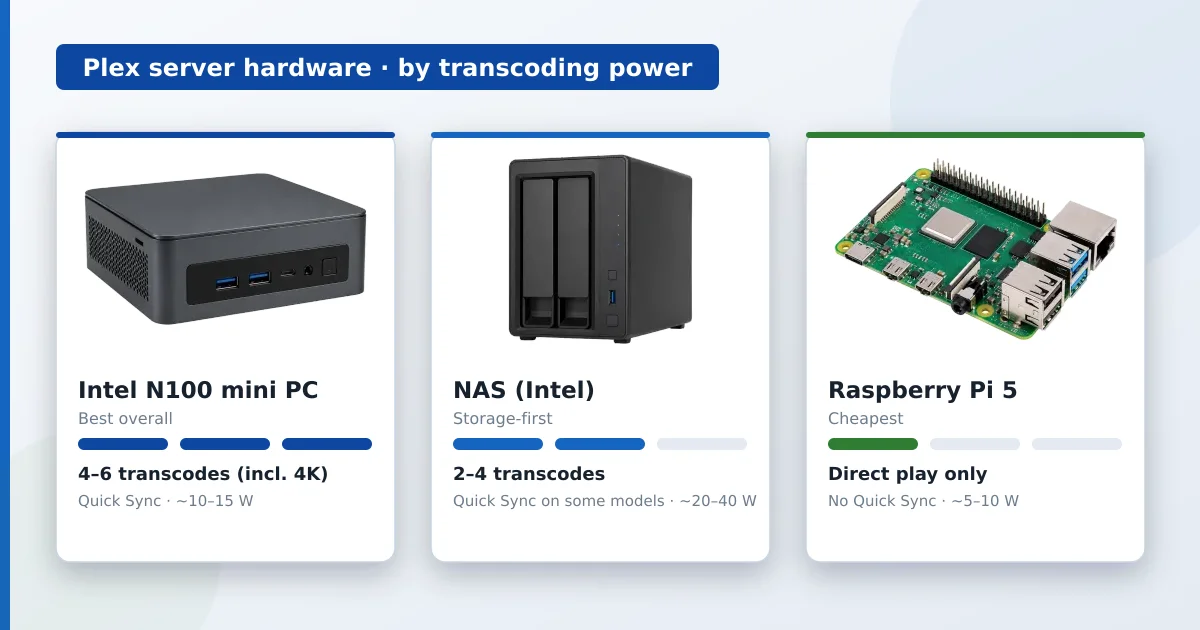
The single biggest factor in Plex server hardware is transcoding. When clients direct-play your files, the server barely works and almost anything suffices. When Plex must convert on the fly — for an incompatible device or a slow remote link — it’s CPU-heavy. Intel Quick Sync (built into most modern Intel CPUs) plus Plex Pass offloads this to dedicated hardware, letting a cheap chip handle several streams. That’s why Quick Sync is the feature to look for.
Hardware by Transcoding Power
| Option | ~Simultaneous transcodes | Quick Sync | Power draw | Best for |
|---|---|---|---|---|
| Intel N100 mini PC | 4–6 (incl. 4K) | ✅ Yes | ~10–15 W | Most people — power + efficiency |
| Synology NAS (Intel) | 2–4 (model-dependent) | Some models | ~20–40 W | Storage-first households |
| Budget ARM NAS | Direct play only | ❌ No | ~10–20 W | Storage, no transcoding |
| Raspberry Pi 5 | Direct play (1 light) | ❌ No | ~5–10 W | Cheap, direct-play only |
| Old PC (Intel 7th gen+) | 2–5 (incl. 4K) | ✅ Usually | 30–80 W | Free start, higher power use |
The Options
Intel N100 Mini PC — Best Overall
A modern Intel N100 mini PC is the sweet spot: strong Quick Sync transcoding, tiny, near-silent, and only ~10–15 W. It handles several streams including 4K with Plex Pass, for around €150–200. For most people building a dedicated Plex server, this is the pick.
NAS — Best for Storage
A NAS (e.g. a 4-bay Synology) shines when you want lots of redundant storage and your server in one box. Intel-based models transcode reasonably; ARM/budget units are direct-play only. Great for big libraries — just check the CPU before relying on it to transcode.
Raspberry Pi 5 — Cheapest
A Raspberry Pi 5 is a low-cost, low-power server for direct play only — no Quick Sync, so real transcoding (especially 4K) struggles. Keep media in device-friendly formats and it serves a small household well for ~€80–100.
Check Raspberry Pi on Amazon →
Old PC — Free Start
An old desktop or laptop (Intel 7th-gen or newer for Quick Sync) is a free way to start: capable transcoding, at the cost of higher power draw and noise. Ideal for testing before buying dedicated hardware.
The Verdict by Budget
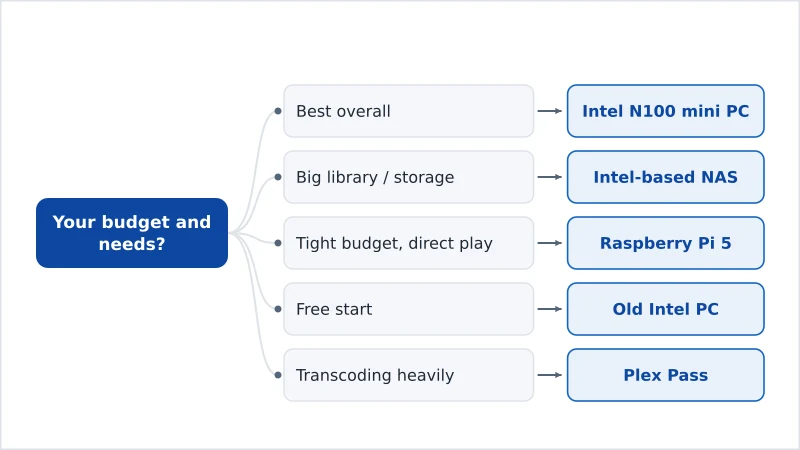
- Best overall: Intel N100 mini PC — Quick Sync transcoding, efficient, ~€150–200.
- Big library / storage-first: Intel-based NAS — redundant storage plus decent transcoding.
- Tight budget, direct play only: Raspberry Pi 5 — cheap and low-power.
- Free start: an old Intel PC — capable, just power-hungry.
- Transcoding heavily? Pair any of these with Plex Pass (or use Jellyfin for free hardware transcoding).
Set the server up with our Plex setup guide, read the full Plex review, compare it with Plex vs Jellyfin, understand the tech in our transcoding and media server explainers, and look up any term in the streaming glossary.