To organise a media library, keep films and TV in separate top-level folders, name movie files as Title (Year) and TV episodes as Show - S01E02, and let your media server fetch metadata and artwork. Clean, consistent naming is what makes Plex, Jellyfin or Emby identify everything correctly. This guide covers naming, folder structure, metadata, posters and tools, with a correct-vs-wrong naming table. It pairs with our media server explainer.
Before You Start
Good organisation means a media server can identify everything automatically. You need:
| You need | Detail |
|---|---|
| Separate libraries | One for Movies, one for TV Shows |
| Consistent naming | Title (Year) and Show - S01E02 |
| A media server | Plex, Jellyfin or Emby to scrape metadata |
| Optional tool | FileBot or similar to automate renaming |
Folder Structure
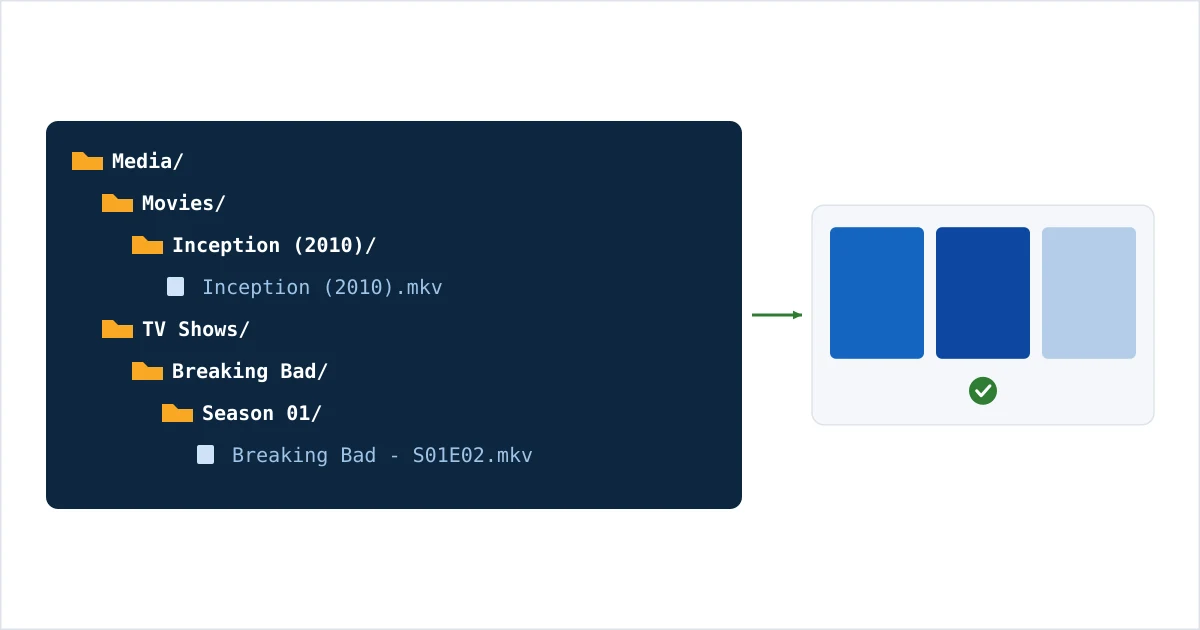
Keep two separate top-level trees:
- Movies/ →
Movies/Inception (2010)/Inception (2010).mkv - TV Shows/ →
TV Shows/Breaking Bad/Season 01/Breaking Bad - S01E02.mkv
Separate libraries for each in your server, pointed at these folders, so the scanner uses the right matching rules for films versus episodes.
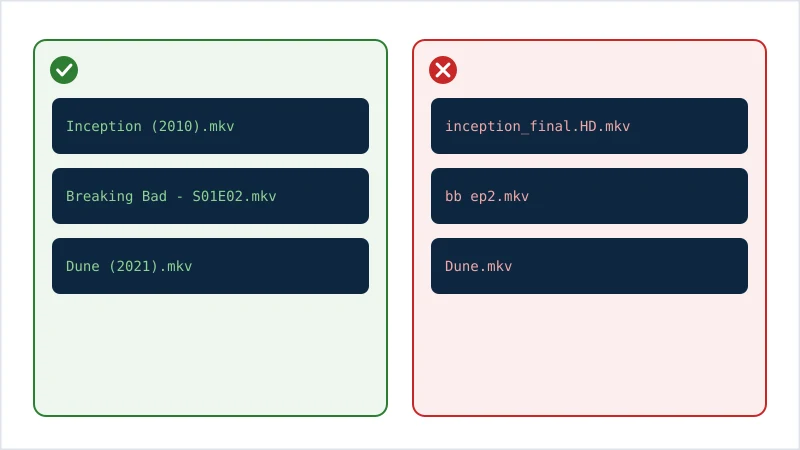
Naming: Correct vs Wrong
| Type | ✅ Correct | ❌ Wrong |
|---|---|---|
| Movie | Inception (2010).mkv |
inception_final.HD.mkv |
| Movie folder | Inception (2010)/ |
Movie1/ |
| TV episode | Breaking Bad - S01E02.mkv |
bb ep2.mkv |
| TV structure | Show/Season 01/… |
all episodes in one folder |
| Remake clarity | Dune (2021).mkv |
Dune.mkv (ambiguous) |
The pattern the scanner needs: Title (Year) for films and SxxExx for episodes. The year disambiguates remakes; the SxxExx maps episodes correctly.
Metadata and Posters
Once files are named correctly, your media server automatically fetches posters, descriptions, cast and subtitles on its first scan. If an entry scrapes wrong — usually a naming issue — use the app’s “Fix Match” tool to point it at the correct title. Refresh metadata after big changes. You rarely need a separate metadata manager if naming is clean.
Tools That Help
- FileBot — automates consistent renaming and folder structure in bulk.
- Your media server’s scraper — Plex/Jellyfin/Emby fetch metadata once names are right.
- A text editor — for quick manual fixes to odd filenames.
Troubleshooting
| Problem | Likely cause | Fix |
|---|---|---|
| Wrong artwork/title | Missing year / bad name | Rename to Title (Year); Fix Match |
| Episodes not matching | No SxxExx pattern | Rename to Show - S01E02 |
| Films and TV mixed up | One shared library | Split into Movies and TV libraries |
| Duplicate entries | Multiple files/versions | Use version folders; clean duplicates |
| Nothing scrapes | Wrong folder pointed | Point the library at the correct root |
The Bottom Line
A well-organised library is mostly about naming: separate Movies and TV Shows, use Title (Year) and Show - S01E02, and your media server does the rest — posters, descriptions and all. Fix the name, and mismatches disappear. Set up your server with our Plex setup guide or Jellyfin setup guide, understand the tech in our media server explainer, add subtitles with our subtitles setup guide, and look up any term in the streaming glossary.