To choose a streaming device, match four things: your ecosystem (Amazon, Google or Apple), your budget, whether you want a stick or a box, and any special needs like Plex, Ethernet or privacy. For most people the Fire TV Stick 4K Max is the best all-round pick, but Apple, Google and power users have better-fitting options. This guide gives you the criteria, a decision table, and a clear recommendation for every type of user.
The Criteria That Matter
Six factors decide the right device. Weigh them in roughly this order:
- Ecosystem — do you use Amazon, Google or Apple services and assistants? Matching the platform makes everything smoother. See Android TV vs Google TV vs Fire OS.
- Budget — cheap (€45–€79) and premium (€150–€220) devices share the same 4K HDR picture; you pay more for speed and refinement, covered in cheap vs premium.
- Stick or box — a stick is cheap and tidy; a box adds power, Ethernet and storage.
- Special needs — Plex and local media, IPTV players, a wired connection, or strong privacy each point to specific devices.
- Picture and sound — any capable device does 4K with Dolby Vision and Atmos; this rarely decides it.
- VPN support — most devices run VPN apps, but Roku needs router-level setup.
Decision Table
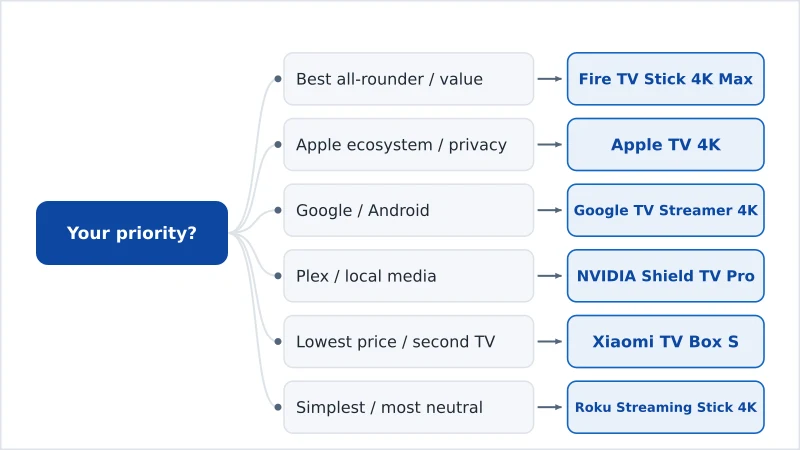
Match your priority to the recommended device:
| Your priority | Best choice | Why |
|---|---|---|
| Best all-rounder / value | Fire TV Stick 4K Max | Fast, cheap, full HDR, Wi-Fi 6E |
| Apple ecosystem / privacy | Apple TV 4K | Fastest, cleanest, most private |
| Google / Android ecosystem | Google TV Streamer 4K | Clean interface, Ethernet, watchlist |
| Plex / local media | NVIDIA Shield TV Pro | Server, transcoding, USB, Ethernet |
| Lowest price / second TV | Xiaomi TV Box S | Play Store + 32 GB under €50 |
| Simplest / most neutral | Roku Streaming Stick 4K | Easiest UI (check EU apps) |
Recommendations by User
- The casual viewer: the Fire TV Stick 4K Max — everything most homes need, cheaply.
- The Apple household: the Apple TV 4K — fast, private, integrated with your iPhone.
- The Google/Android user: the Google TV Streamer 4K — clean interface with a watchlist and Ethernet.
- The media enthusiast: the NVIDIA Shield TV Pro — Plex server, local files, upscaling.
- The budget buyer: the Xiaomi TV Box S or a discounted Fire TV Stick 4K — see best under €50.
- The second-TV setup: a cheap stick — no need to overspend.
What You Can Ignore
A few things worry buyers more than they should:
- 8K support — content is scarce; 4K is the practical ceiling.
- Tiny picture differences — capable devices look effectively identical.
- The latest chip — even mid-range devices stream apps smoothly; speed matters most for heavy multitaskers.
Our default pick: if you are unsure, get the Fire TV Stick 4K Max. It suits the widest range of homes, is cheap, and does everything most people need. Only stray from it for a specific reason — Apple, Google, Plex or the lowest price.
Our default pick: Fire TV Stick 4K Max →
The Bottom Line
Choosing a streaming device is mostly about ecosystem, budget and special needs — not picture quality, which is similar across capable models. Match the platform you already use, decide between a tidy stick and a powerful box, and only pay more for speed, privacy or Plex if you need them. For most people the Fire TV Stick 4K Max is the safe, smart default; the decision table above points everyone else to their best fit.
Compare every model in our best streaming devices guide, and look up any term in the streaming glossary.