If your VPN is slowing your streaming, the fastest fixes are to switch to a nearby server, use a WireGuard-based protocol, and wire up your connection. Most slow-VPN complaints come from a distant or overloaded server, not the VPN itself — a good VPN on a nearby server loses only 10–20% of speed. This guide gives nine proven fixes ordered by impact, plus a diagnosis table. For the fastest VPNs, see our fastest VPN guide.
Quick Wins First
Start with the three fixes that solve most slow-VPN problems:
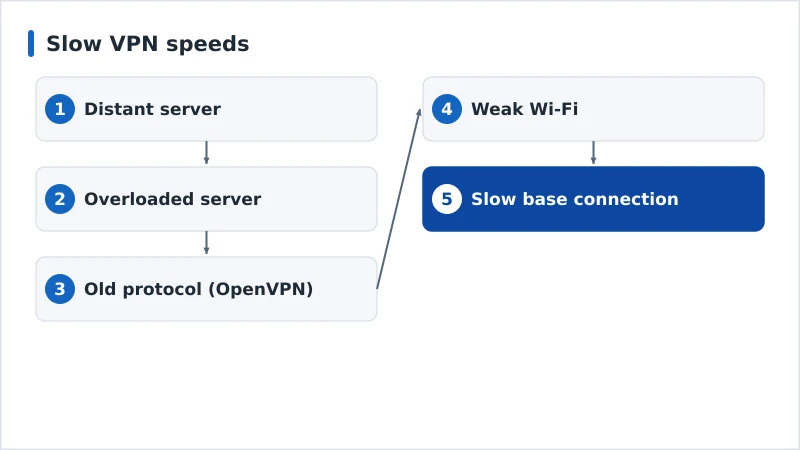
- Switch to a nearby server. The farther data travels, the slower it gets. A server in or near your country is fastest — distance is the number-one cause of slow VPNs.
- Use a WireGuard-based protocol. In settings, choose NordLynx, Lightway or WireGuard — far faster than older OpenVPN.
- Change to a less busy server. An overloaded server is slow even if it’s nearby; try another, or a “recommended” option.
Deeper Fixes
If it’s still slow, work through these in order:
- Wire up or improve Wi-Fi. A wired connection or strong 5 GHz signal removes the network as a variable.
- Restart the VPN and router. Clears stale connections and congestion.
- Close background apps and downloads. They compete for bandwidth with your stream.
- Check your base speed. Test without the VPN — if that’s slow too, the VPN isn’t the problem; see the internet speed guide.
- Update the VPN app. Newer versions fix performance bugs.
- Try split tunnelling. Route only streaming through the VPN, or exclude heavy background apps, to free up bandwidth.
Diagnose It
Work through these to find the cause:
| Symptom | Likely cause | Fix |
|---|---|---|
| Slow only on distant servers | Server distance | Use a nearby server |
| Slow on all servers | Old protocol | Switch to WireGuard-based |
| Slow at peak times only | Server overload / ISP throttling | Change server; test throttling |
| Slow with and without VPN | Base connection | Fix Wi-Fi / upgrade plan |
| Buffering, speed test fine | Weak Wi-Fi | Wire up or use 5 GHz |
| Slow after an update | App bug | Update again or reinstall |
Rule of thumb: a good VPN on a nearby server should retain around 80–88% of your speed. If you're losing much more than that, it's almost always the server or protocol — not encryption itself.
The Bottom Line
Slow VPN speeds are usually a distant or overloaded server, or an old protocol — not the VPN as such. Switch to a nearby server, use a WireGuard-based protocol, and wire up your connection, and most of the speed returns. Check your base speed to rule out your own line, and update the app. If a VPN is still slow after all nine fixes, it may simply be a slower service — our fastest VPN guide ranks the quickest, led by NordVPN.
Understand the numbers in our VPN speed test methodology, get streaming-specific tips in our fix a slow VPN while streaming guide, and start from our streaming troubleshooting checklist, and look up any term in the streaming glossary.