| # | Product | Rating | Price | |
|---|---|---|---|---|
| 1 | Apple TV 4KBest for Dolby Vision | ≈ €169 | Check Price | |
| 2 | NVIDIA Shield TV ProBest for Upscaling & Plex | ≈ €219 | Check Price | |
| 3 | Ultra High Speed HDMI 2.1 CableFor 4K/HDR/Atmos | ≈ €15 | Check Price |
A home theatre streaming setup needs a top 4K device (Apple TV 4K for Dolby Vision, or NVIDIA Shield for upscaling), an AV receiver or Atmos soundbar via HDMI eARC, Ultra High Speed HDMI 2.1 cables, and the right picture and audio settings. This guide covers the device, sound, cables and optimal settings for reference-quality Dolby Vision and Atmos. For device depth, see our Apple TV 4K review and NVIDIA Shield review.
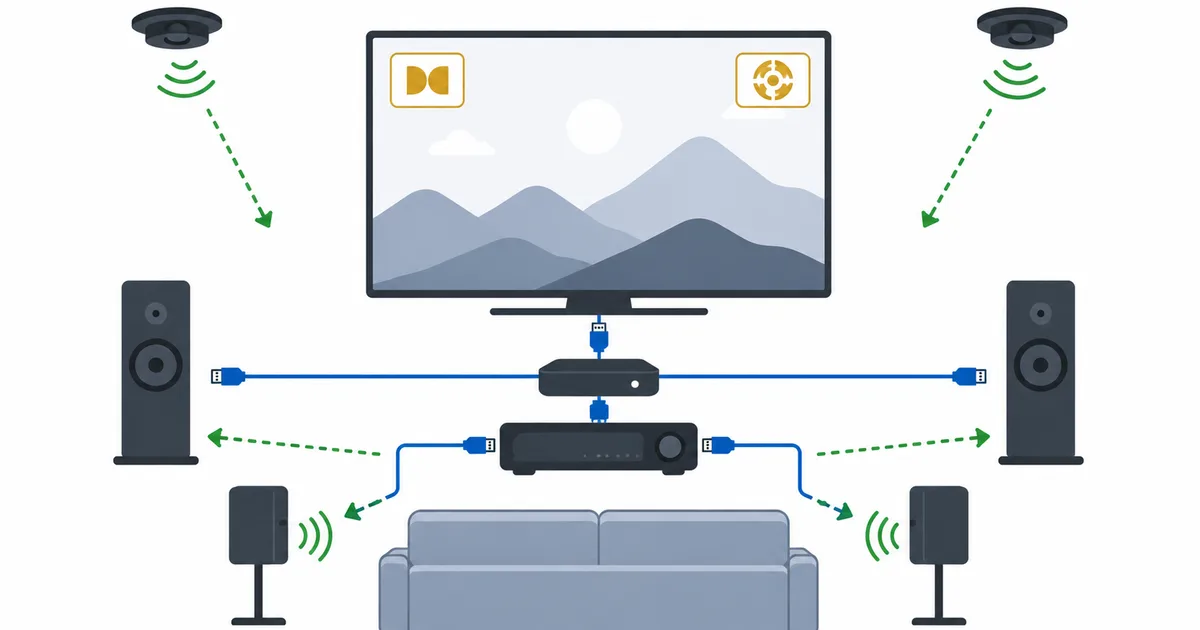
The Device: Reference 4K
For a home theatre, use a premium box that outputs 4K Dolby Vision and Atmos:
- Apple TV 4K (≈ €169) — the best Dolby Vision handling, polished apps, “Match Content” for native formats.
- NVIDIA Shield TV Pro (≈ €219) — powerful AI upscaling and Plex strengths.
The Sound: AV Receiver or Atmos Soundbar
- AV receiver + speakers — the most immersive, true surround home cinema.
- Dolby Atmos soundbar — simpler and cheaper, still room-filling.
Both should support Dolby Atmos and connect via HDMI eARC — see our streaming audio formats guide. If sound fails, our no sound guide and audio sync guide help.
Check Atmos Soundbars on Amazon →
The Cables: HDMI 2.1
Use Ultra High Speed (HDMI 2.1) cables for full 4K/HDR, high frame rates and Atmos passthrough via eARC — see our HDMI versions guide. Cheap cables cause dropouts and format failures.
Check HDMI 2.1 Cables on Amazon →
Optimal Settings

| Setting | Home-theatre value |
|---|---|
| Video output | 4K, Dolby Vision (or HDR10) |
| Picture mode | Cinema / Filmmaker (not Vivid) |
| HDMI input mode | Enhanced / full colour on |
| Audio | Dolby Atmos enabled, via eARC |
| Content matching | On (e.g. Apple TV “Match Content”) |
If HDR looks flat, see our HDR washed out guide; if 4K won’t engage, the fix 4K guide.
The Bottom Line
A home theatre streaming setup is about getting 4K Dolby Vision and Atmos end to end: a top 4K box (Apple TV 4K or NVIDIA Shield), an AV receiver or Atmos soundbar via eARC, HDMI 2.1 cables, and Cinema-mode settings with enhanced colour. Configured right, it delivers reference-quality picture and sound. Read the Apple TV 4K and NVIDIA Shield reviews, understand audio formats and HDMI versions, for a lighter budget see the setup under €300, and look up any term in the streaming glossary.