HDMI versions determine the maximum resolution, frame rate and HDR your setup can carry between devices. For streaming, the key point is reassuring: HDMI 2.0 (2.0a or later for HDR) already handles 4K at 60Hz with HDR, which is all any streaming service delivers. HDMI 2.1’s huge extra bandwidth mainly benefits high-frame-rate gaming and 8K. This guide explains how HDMI 1.4, 2.0 and 2.1 differ, and exactly what you need for 4K and 8K.
What an HDMI Version Controls
HDMI carries picture and sound between devices, and each version sets a bandwidth ceiling that limits three things together:
- Resolution — 1080p, 4K, 8K.
- Frame rate — 30Hz, 60Hz, 120Hz.
- HDR and colour — whether it can carry HDR and richer colour depth.
You can’t have all three at maximum unless the bandwidth allows it. Higher HDMI versions simply raise that ceiling — but streaming does not push it as hard as gaming does.
The Versions Explained
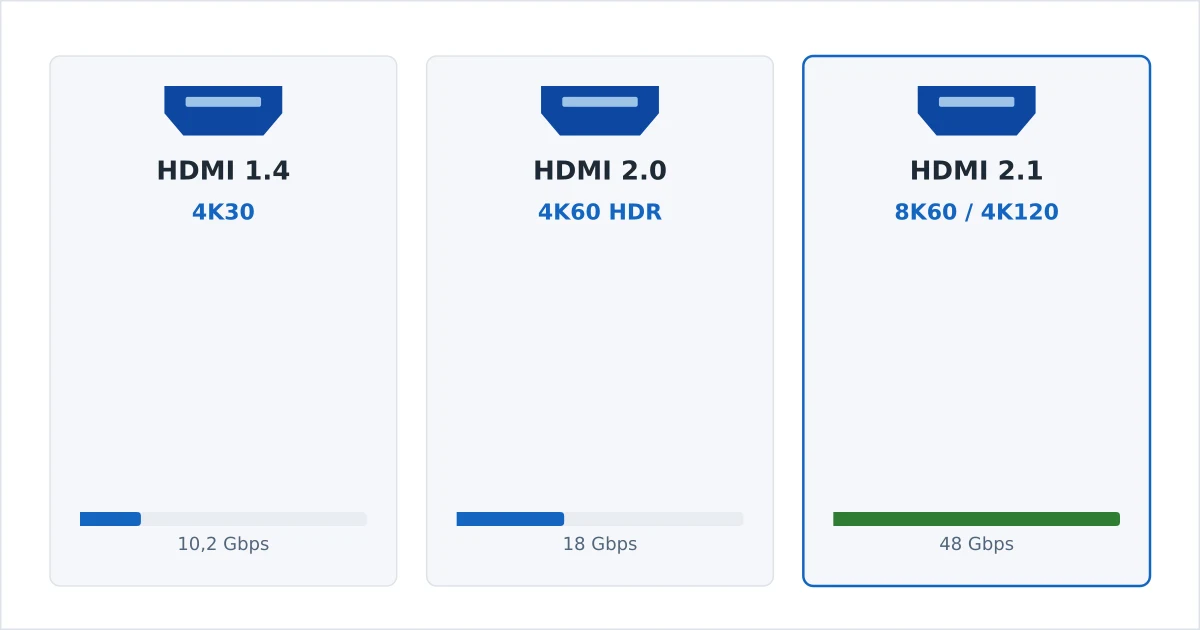
- HDMI 1.4 — up to 4K at 30Hz (10.2 Gbps). Fine for 1080p; 4K feels choppy at 30Hz. Dated for modern streaming.
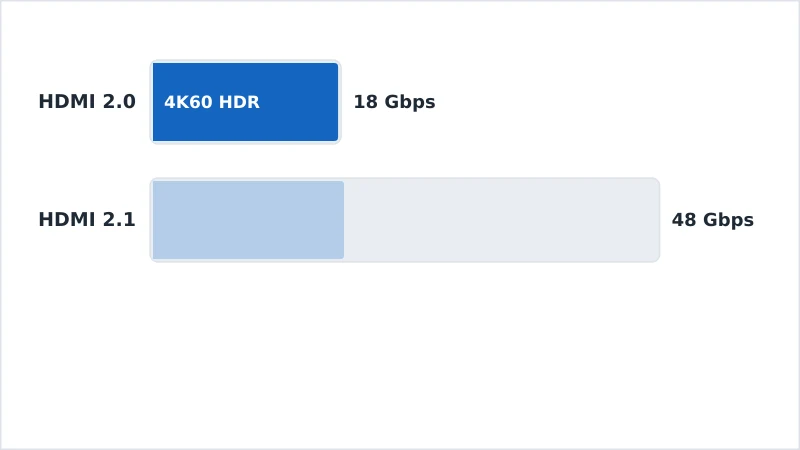
- HDMI 2.0 / 2.0a / 2.0b — up to 4K at 60Hz with HDR (18 Gbps). The streaming sweet spot — handles everything services deliver. (2.0a added HDR.)
- HDMI 2.1 — up to 8K at 60Hz and 4K at 120Hz (48 Gbps), plus gaming features (VRR, ALLM) and eARC. Aimed at gamers and future 8K.
For streaming specifically, the jump that matters is 1.4 → 2.0; 2.0 → 2.1 is mostly about gaming and 8K.
Version Comparison Table
| Version | Bandwidth | Max video | HDR | Streaming need |
|---|---|---|---|---|
| HDMI 1.4 | 10.2 Gbps | 4K @ 30Hz | Limited | Dated |
| HDMI 2.0/2.0a | 18 Gbps | 4K @ 60Hz | Yes (2.0a+) | ✅ Ideal |
| HDMI 2.1 | 48 Gbps | 8K @ 60Hz / 4K @ 120Hz | Yes | Overkill for video |
The takeaway: HDMI 2.0a or later is all you need for 4K HDR streaming. HDMI 2.1 is worthwhile only if you also game at high frame rates or plan for 8K.
What You Need for Streaming
Because streaming tops out at 4K 60Hz, your needs are modest:
- For 4K HDR streaming: HDMI 2.0a or later on the TV, the streaming device, and any receiver in between.
- For 8K streaming: HDMI 2.1 — but 8K content is still rare, so this is future-proofing.
- For 4K 120Hz gaming: HDMI 2.1 — a gaming need, not a streaming one.
- Match the whole chain. The lowest version in the path (device → receiver → TV) sets the limit.
Don't overspend: you do not need an HDMI 2.1 TV or cable to stream 4K HDR from Netflix, Disney+ or any service. HDMI 2.0a covers it fully. Save 2.1 for gaming or genuine 8K plans.
Cables and eARC
The cable must carry the bandwidth you use:
- Premium High Speed HDMI (18 Gbps) — correct for 4K HDR streaming.
- Ultra High Speed HDMI (48 Gbps) — needed only for HDMI 2.1 features (8K, 4K 120Hz).
- A cable that can’t carry the bandwidth causes dropouts, black screens or a downgraded resolution — sometimes mistaken for an HDCP fault.
eARC (HDMI 2.1) is worth knowing about even for streamers: it sends high-bitrate audio like Dolby Atmos from the TV back to a soundbar or receiver over a single HDMI cable, improving on the older ARC.
The Bottom Line
HDMI versions set the ceiling for resolution, frame rate and HDR — but streaming does not need the top of the range. HDMI 2.0a or later fully handles 4K at 60Hz with HDR, which is everything services deliver, paired with a Premium High Speed cable. HDMI 2.1’s 48 Gbps is for 8K and high-frame-rate gaming, not video streaming. Match every device in the chain to at least 2.0a and you are set.
Next, see why a mismatched device can black out your screen in HDCP explained, or how the picture itself improves in HDR explained.
Not sure about a term on this page? Look it up in the streaming glossary.