Streaming video uses roughly 1 GB per hour for SD, 3 GB for HD (1080p) and 7 GB for 4K, per stream — while music uses far less, around 40–150 MB per hour. Exact figures vary by service and codec, since efficient codecs deliver the same quality with less data. This guide gives clear numbers by quality and content type, shows how fast a data cap disappears, and explains how to stream more without blowing your allowance.
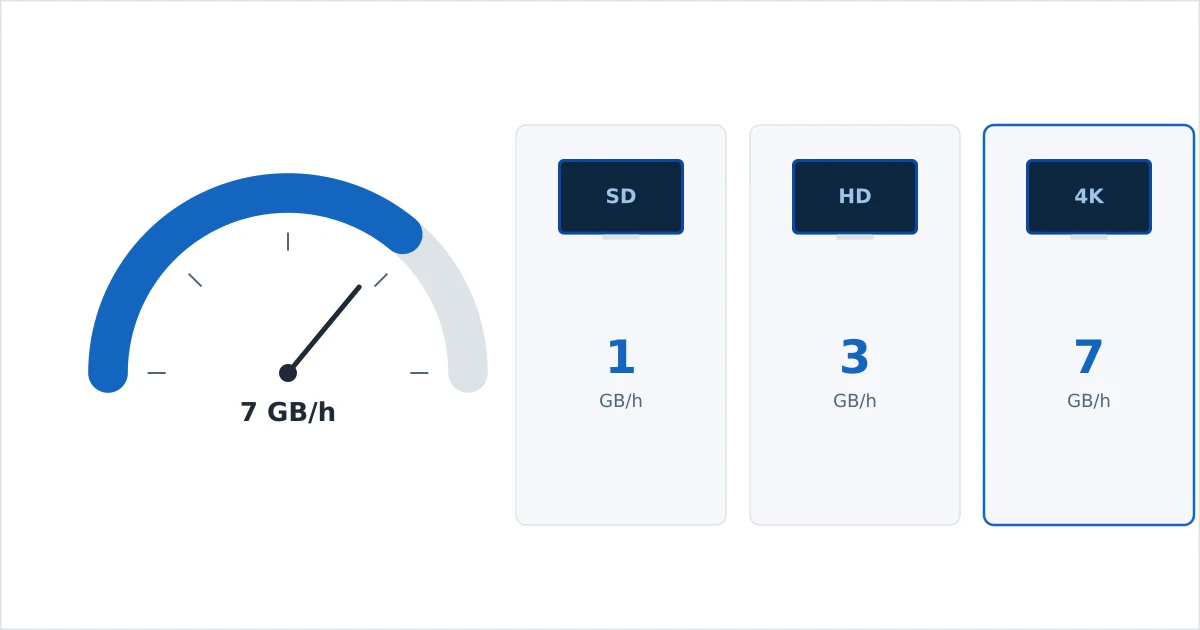
Data Usage by Video Quality
Higher quality means a higher bitrate, which means more data per hour. These are per-stream averages:
| Quality | Data per hour | Two-hour film |
|---|---|---|
| SD (480p) | ~1 GB | ~2 GB |
| HD (720p) | ~2 GB | ~4 GB |
| Full HD (1080p) | ~3 GB | ~6 GB |
| 4K (2160p) | ~7 GB (up to 10+) | ~14 GB |
Two things shift the real number: the service (some use higher bitrates than others) and the codec — efficient H.265 and AV1 can cut usage meaningfully versus older H.264.
Music and Audio Usage
Audio is a fraction of video. Typical music-streaming usage:
| Quality | Data per hour |
|---|---|
| Normal (~96–128 kbps) | ~40–70 MB |
| High (~256–320 kbps) | ~150 MB |
| Lossless / hi-res | ~300 MB–1 GB+ |
Even heavy daily listening rarely stresses a home connection, though lossless on a small mobile plan adds up. Dolby Atmos and surround audio with video add only a little on top of the video figures.
What It Means for a Data Cap
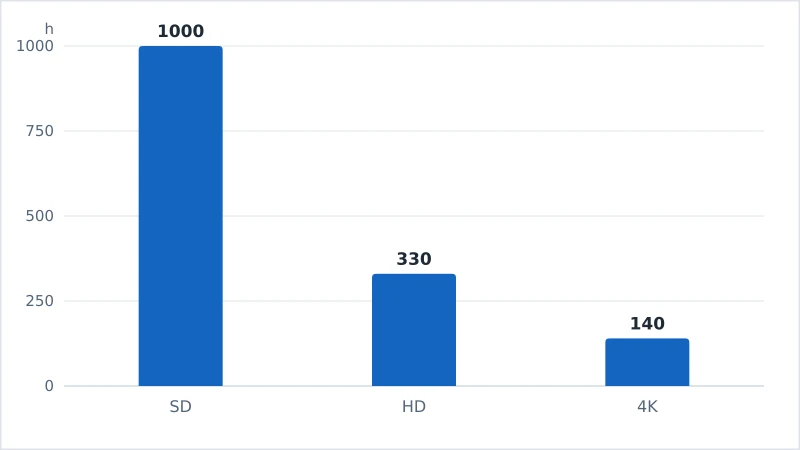
If your home or mobile plan has a data cap, quality choice matters a lot. Using the averages above, a 1 TB monthly cap roughly allows:
- ~1,000 hours of SD, or
- ~330 hours of HD (1080p), or
- ~140 hours of 4K.
That sounds generous until a household streams 4K daily across several devices. A single evening of 4K films for two people can be 30–40 GB. If you are on a mobile connection or a metered plan, 4K can exhaust an allowance in days — which is why data-saver settings exist.
How to Reduce Data Usage
To stream comfortably under a cap without a big quality hit:
- Lower the quality in each service’s settings — capping at HD roughly halves 4K usage.
- Use data-saver modes where offered (most major services have them).
- Download on Wi-Fi to watch offline, avoiding repeat streaming of the same title.
- Turn off autoplay previews, which stream video as you browse.
- Prefer Wi-Fi over mobile data, and check which services use the most.
- Match quality to the screen — 1080p often looks identical to 4K on smaller screens while using far less data.
Quick win: if you watch mostly on phones and small TVs, capping streaming at 1080p saves a lot of data for almost no visible loss — the 4K difference only shows on a large screen viewed fairly close.
The Bottom Line
Plan on about 1 GB per hour for SD, 3 GB for HD and 7 GB for 4K per video stream, with music a tiny fraction at 40–150 MB per hour. Those numbers make a data cap real: a 1 TB allowance is roughly 140 hours of 4K but ten times more SD. If you are capped or on mobile, cap the resolution, use data-saver modes and download on Wi-Fi — and remember efficient codecs and smaller screens quietly cut usage too.
Need the numbers at a glance? See the streaming cheat sheet, or look up any term in the streaming glossary.