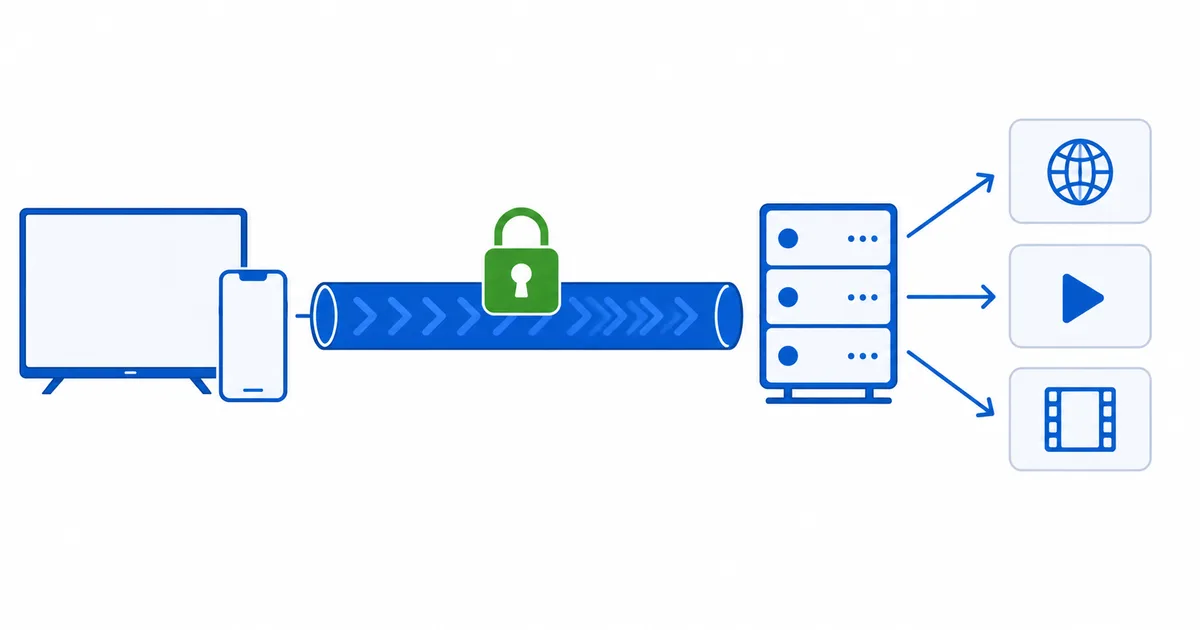
A VPN (Virtual Private Network) creates an encrypted tunnel between your device and a VPN server, then routes your internet traffic through it — so your ISP can’t see what you’re doing, and websites see the server’s IP address instead of yours. The result is more privacy and a changed apparent location. This beginner’s guide explains, in plain language, how that tunnel works, what a VPN does and doesn’t hide, and what it means for streaming.
What a VPN Is
Normally, your device connects directly to websites and apps, and your ISP can see which servers you contact. Your public IP address — a number that also reveals your rough location — is visible to every site you use.
A VPN inserts a secure middle step. It builds an encrypted tunnel to a VPN server, and all your traffic flows through it. Two things change:
- Your ISP and local network see only encrypted data to the VPN server, not the sites inside.
- Websites see the VPN server’s IP, not yours — so your apparent location becomes the server’s.
How a VPN Works, Step by Step
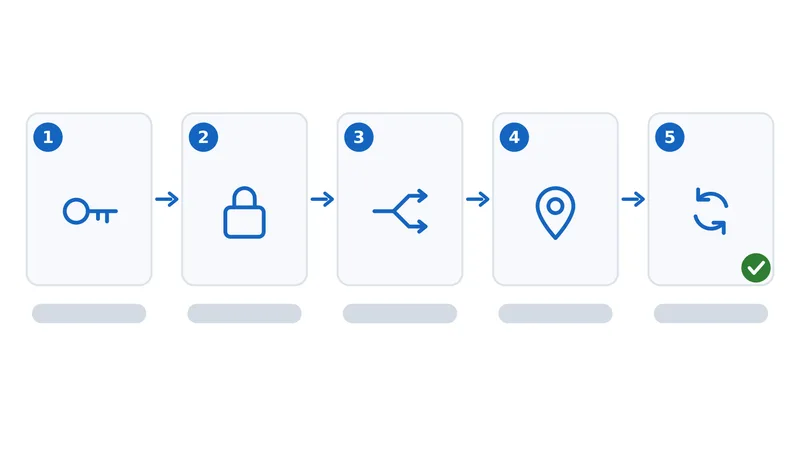
When you connect a VPN app, here is what happens:
- Authentication. Your app securely connects to a VPN server you choose.
- Tunnel and encryption. It negotiates keys and builds an encrypted tunnel using a VPN protocol such as WireGuard or OpenVPN.
- Traffic routing. Your internet traffic is encrypted and sent through the tunnel to the server.
- Exit to the internet. The server decrypts it and forwards it to the destination, using its own IP.
- Return trip. Responses come back to the server, through the tunnel, and are decrypted on your device.
To your ISP, it all looks like a single encrypted connection to one server. To the websites, you appear to be wherever the server is.
What a VPN Does and Doesn't Hide
Being clear about this avoids false expectations:
| A VPN hides | A VPN does not hide |
|---|---|
| Your traffic content from your ISP | The fact that you’re using a VPN |
| Which sites/services you use, from your ISP | Activity you sign into (your accounts still know you) |
| Your real IP and location from websites | Everything, from the VPN provider itself |
| Data on public Wi-Fi, via encryption | You completely — it’s privacy, not full anonymity |
Because the VPN provider can see your traffic in principle, a no-logs provider you trust matters — a point we return to in our best VPN for streaming guide.
VPNs and Streaming
For streaming, a VPN offers a few concrete benefits and one trade-off:
- Privacy on shared Wi-Fi — encrypts your connection on hotel, café and airport networks.
- Bypassing traffic-specific throttling — if your ISP slows video, encryption hides the traffic type; see ISP throttling.
- Security while travelling — a consistent, protected connection away from home.
- The trade-off: some speed loss. Encryption and distance add overhead — usually small with a nearby server, larger with a distant one.
On regions and travel: within the EU, portability rules already let your subscriptions travel with you. A VPN's apparent-location change is often detected by major platforms, so treat unblocking as unreliable and use a VPN mainly for privacy and security.
Choosing a VPN
The traits that matter most for streaming:
- Speed — fast servers and modern protocols like WireGuard keep the slowdown small.
- A no-logs policy — ideally independently audited.
- Nearby server coverage — a close server means less latency and higher quality.
- App support — apps for your devices, including Fire TV and other streaming boxes.
Our tested picks are in the best VPN for streaming guide.
The Bottom Line
A VPN wraps your internet traffic in an encrypted tunnel to a server, hiding what you do from your ISP and swapping your IP for the server’s. For streaming that means privacy on public Wi-Fi, a way around traffic-specific throttling, and security while travelling — at the cost of a little speed. It is a genuine privacy tool, not a cloak of full anonymity, so choose a fast, trustworthy no-logs provider and a nearby server.
Next, compare the tunnels themselves in VPN protocols: WireGuard vs OpenVPN, or set one up on your TV with our VPN on Fire TV guide.
Not sure about a term on this page? Look it up in the streaming glossary.